 收藏
收藏钉钉机器人如何发送图文并茂的消息(无需图床,支持外部群)

 影刀专家
影刀专家话不多说,直接上代码(直接给魔法指令生成就可以)
# 使用此指令前,请确保安装必要的Python库,例如使用以下命令安装:
# pip install requests
import requests
import time
import hashlib
import hmac
import base64
import urllib.parse
import json
import os
from typing import *
try:
from xbot.app.logging import trace as print
except:
from xbot import print
def send_dingtalk_message_with_image(webhook_url, secret, message_text, image_path=None, client_id=None, client_secret=None):
"""
title: 钉钉机器人图文消息发送
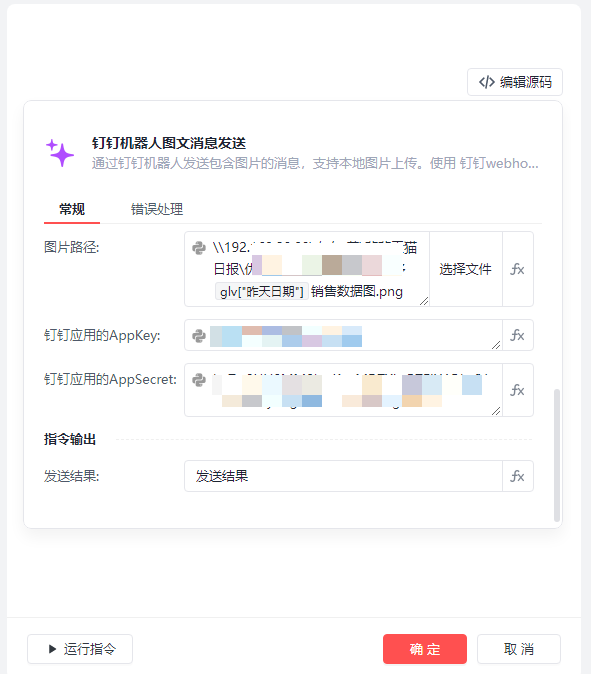
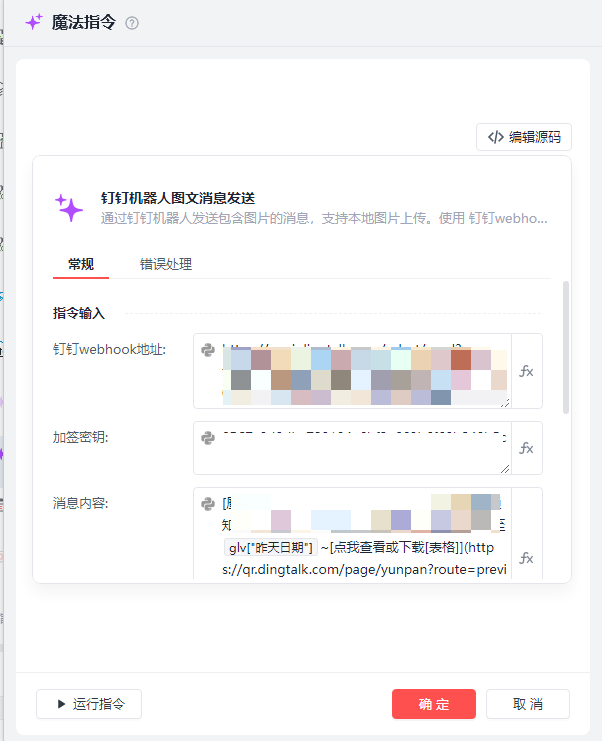
description: 通过钉钉机器人发送包含图片的消息,支持本地图片上传。使用 %webhook_url% 和 %secret% 进行安全验证,可通过 %client_id% 和 %client_secret% 获取更高权限。
inputs:
- webhook_url (str): 钉钉webhook地址,eg: "https://oapi.dingtalk.com/robot/send?access_token=xxx"
- secret (str): 加签密钥,eg: "SECxxx"
- message_text (str): 消息内容,eg: "测试消息"
- image_path (file): 图片路径,eg: "C:/image.png"
- client_id (str): 钉钉应用的AppKey,eg: "dingxxx"
- client_secret (str): 钉钉应用的AppSecret,eg: "xxxxx"
outputs:
- result (str): 发送结果,eg: "消息发送成功"
"""
# 检查输入参数
if not webhook_url or not webhook_url.startswith("https://oapi.dingtalk.com/robot/send?access_token="):
return "webhook_url格式不正确"
if not secret:
return "加签密钥不能为空"
if image_path and not os.path.exists(image_path):
return f"图片路径不存在: {image_path}"
# 获取access_token
access_token = None
if client_id and client_secret:
try:
# 使用client_id和client_secret获取access_token
token_url = "https://oapi.dingtalk.com/gettoken"
params = {
"appkey": client_id,
"appsecret": client_secret
}
response = requests.get(token_url, params=params)
token_result = response.json()
if token_result.get("errcode") == 0:
access_token = token_result.get("access_token")
else:
return f"获取access_token失败: {token_result}"
except Exception as e:
return f"获取access_token出错: {str(e)}"
else:
# 从webhook_url中提取access_token
access_token = webhook_url.split("access_token=")[1].split("&")[0]
# 处理加签
timestamp = str(round(time.time() * 1000))
string_to_sign = f"{timestamp}\n{secret}"
hmac_code = hmac.new(secret.encode(), string_to_sign.encode(), digestmod=hashlib.sha256).digest()
sign = urllib.parse.quote_plus(base64.b64encode(hmac_code))
# 构建带签名的webhook URL
signed_url = f"{webhook_url}×tamp={timestamp}&sign={sign}"
# 上传图片并获取URL
media_id = None
if image_path:
try:
# 上传图片到钉钉服务器
upload_url = "https://oapi.dingtalk.com/media/upload"
params = {"access_token": access_token, "type": "image"}
with open(image_path, 'rb') as f:
files = {'media': (os.path.basename(image_path), f, 'image/png')}
upload_response = requests.post(upload_url, params=params, files=files)
upload_result = upload_response.json()
if "media_id" in upload_result:
media_id = upload_result["media_id"]
else:
return f"图片上传失败: {upload_result}"
except Exception as e:
return f"图片上传出错: {str(e)}"
# 构建消息内容
if media_id:
# 使用FeedCard类型,图片在上方
message = {
"msgtype": "markdown",
"markdown": {
"title": "钉钉消息",
"text": f"\n\n{message_text}"
}
}
else:
# 纯文本消息
message = {
"msgtype": "markdown",
"markdown": {
"title": "钉钉消息",
"text": message_text
}
}
# 发送消息
headers = {'Content-Type': 'application/json'}
response = requests.post(signed_url, headers=headers, data=json.dumps(message))
# 返回结果
if response.status_code == 200:
result = response.json()
if result.get('errcode') == 0:
return "消息发送成功"
else:
return f"消息发送失败: {result}"
else:
return f"请求失败,状态码: {response.status_code},响应: {response.text}"
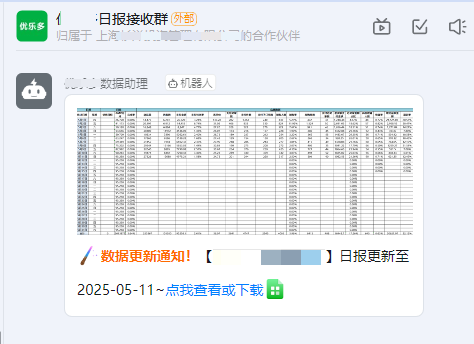
以下上传一个指令图和效果图
收藏24


