 收藏
收藏影刀32位安装curl_cffi库失败
Looking in indexes: https://pypi.tuna.tsinghua.edu.cn/simple, http://mirrors.aliyun.com/pypi/simple
Looking in links: d:\ShadowBot\shadowbot-5.14.38\python\\whls
Collecting curl_cffi
File was already downloaded c:\users\admin\appdata\local\shadowbot\cache\packages\curl_cffi-0.5.10.tar.gz
Installing build dependencies: started
Installing build dependencies: finished with status 'done'
Getting requirements to build wheel: started
Getting requirements to build wheel: finished with status 'done'
Preparing metadata (pyproject.toml): started
Preparing metadata (pyproject.toml): finished with status 'done'
Collecting cffi>=1.12.0 (from curl_cffi)
File was already downloaded c:\users\admin\appdata\local\shadowbot\cache\packages\cffi-1.15.1-cp37-cp37m-win32.whl
Collecting pycparser (from cffi>=1.12.0->curl_cffi)
File was already downloaded c:\users\admin\appdata\local\shadowbot\cache\packages\pycparser-2.21-py2.py3-none-any.whl
Successfully downloaded curl_cffi cffi pycparser
Looking in links: d:\ShadowBot\shadowbot-5.14.38\python\Lib\site-packages, c:\Users\admin\AppData\Local\Shadowbot\cache\packages
Processing c:\users\admin\appdata\local\shadowbot\cache\packages\curl_cffi-0.5.10.tar.gz
Installing build dependencies: started
Installing build dependencies: finished with status 'done'
Getting requirements to build wheel: started
Getting requirements to build wheel: finished with status 'done'
Preparing metadata (pyproject.toml): started
Preparing metadata (pyproject.toml): finished with status 'done'
Processing c:\users\admin\appdata\local\shadowbot\cache\packages\cffi-1.15.1-cp37-cp37m-win32.whl (from curl_cffi)
Processing c:\users\admin\appdata\local\shadowbot\cache\packages\pycparser-2.21-py2.py3-none-any.whl (from cffi>=1.12.0->curl_cffi)
Building wheels for collected packages: curl_cffi
Building wheel for curl_cffi (pyproject.toml): started
Building wheel for curl_cffi (pyproject.toml): finished with status 'error'
error: subprocess-exited-with-error
Building wheel for curl_cffi (pyproject.toml) did not run successfully.
exit code: 1
[84 lines of output]
running bdist_wheel
running build
running build_py
creating build
creating build\lib.win32-cpython-37
creating build\lib.win32-cpython-37\curl_cffi
copying curl_cffi\aio.py -> build\lib.win32-cpython-37\curl_cffi
copying curl_cffi\build.py -> build\lib.win32-cpython-37\curl_cffi
copying curl_cffi\const.py -> build\lib.win32-cpython-37\curl_cffi
copying curl_cffi\curl.py -> build\lib.win32-cpython-37\curl_cffi
copying curl_cffi\__init__.py -> build\lib.win32-cpython-37\curl_cffi
copying curl_cffi\__version__.py -> build\lib.win32-cpython-37\curl_cffi
creating build\lib.win32-cpython-37\curl_cffi\requests
copying curl_cffi\requests\cookies.py -> build\lib.win32-cpython-37\curl_cffi\requests
copying curl_cffi\requests\errors.py -> build\lib.win32-cpython-37\curl_cffi\requests
copying curl_cffi\requests\headers.py -> build\lib.win32-cpython-37\curl_cffi\requests
copying curl_cffi\requests\models.py -> build\lib.win32-cpython-37\curl_cffi\requests
copying curl_cffi\requests\session.py -> build\lib.win32-cpython-37\curl_cffi\requests
copying curl_cffi\requests\__init__.py -> build\lib.win32-cpython-37\curl_cffi\requests
running egg_info
writing curl_cffi.egg-info\PKG-INFO
writing dependency_links to curl_cffi.egg-info\dependency_links.txt
writing requirements to curl_cffi.egg-info\requires.txt
writing top-level names to curl_cffi.egg-info\top_level.txt
reading manifest file 'curl_cffi.egg-info\SOURCES.txt'
reading manifest template 'MANIFEST.in'
C:\Users\admin\AppData\Local\Temp\pip-build-env-j1dvq9nw\overlay\Lib\site-packages\setuptools\config\pyprojecttoml.py:66: _BetaConfiguration: Support for `[tool.setuptools]` in `pyproject.toml` is still *beta*.
config = read_configuration(filepath, True, ignore_option_errors, dist)
warning: no files found matching 'curl_cffi\cacert.pem'
warning: no files found matching 'curl_cffi\_wrapper.*'
warning: no files found matching 'curl_cffi\include\curl\*'
adding license file 'LICENSE'
writing manifest file 'curl_cffi.egg-info\SOURCES.txt'
creating build\lib.win32-cpython-37\curl_cffi\ffi
copying curl_cffi\ffi\cdef.c -> build\lib.win32-cpython-37\curl_cffi\ffi
copying curl_cffi\ffi\shim.c -> build\lib.win32-cpython-37\curl_cffi\ffi
copying curl_cffi\ffi\shim.h -> build\lib.win32-cpython-37\curl_cffi\ffi
running build_ext
generating cffi module 'build\\temp.win32-cpython-37\\Release\\curl_cffi._wrapper.c'
creating build\temp.win32-cpython-37
creating build\temp.win32-cpython-37\Release
building 'curl_cffi._wrapper' extension
C:\Users\admin\AppData\Local\Temp\pip-build-env-j1dvq9nw\overlay\Lib\site-packages\setuptools\command\build_py.py:201: _Warning: Package 'curl_cffi.ffi' is absent from the `packages` configuration.
!!
********************************************************************************
############################
# Package would be ignored #
############################
Python recognizes 'curl_cffi.ffi' as an importable package[^1],
but it is absent from setuptools' `packages` configuration.
This leads to an ambiguous overall configuration. If you want to distribute this
package, please make sure that 'curl_cffi.ffi' is explicitly added
to the `packages` configuration field.
Alternatively, you can also rely on setuptools' discovery methods
(for example by using `find_namespace_packages(...)`/`find_namespace:`
instead of `find_packages(...)`/`find:`).
You can read more about "package discovery" on setuptools documentation page:
- https://setuptools.pypa.io/en/latest/userguide/package_discovery.html
If you don't want 'curl_cffi.ffi' to be distributed and are
already explicitly excluding 'curl_cffi.ffi' via
`find_namespace_packages(...)/find_namespace` or `find_packages(...)/find`,
you can try to use `exclude_package_data`, or `include-package-data=False` in
combination with a more fine grained `package-data` configuration.
You can read more about "package data files" on setuptools documentation page:
- https://setuptools.pypa.io/en/latest/userguide/datafiles.html
[^1]: For Python, any directory (with suitable naming) can be imported,
even if it does not contain any `.py` files.
On the other hand, currently there is no concept of package data
directory, all directories are treated like packages.
********************************************************************************
!!
check.warn(importable)
error: Microsoft Visual C++ 14.0 or greater is required. Get it with "Microsoft C++ Build Tools": https://visualstudio.microsoft.com/visual-cpp-build-tools/
[end of output]
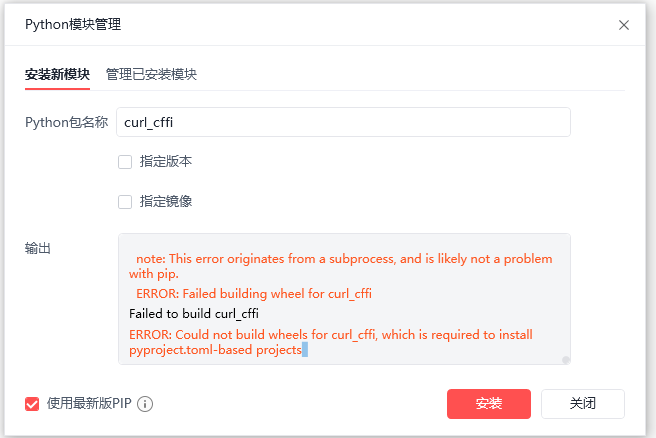
note: This error originates from a subprocess, and is likely not a problem with pip.
ERROR: Failed building wheel for curl_cffi
Failed to build curl_cffi
ERROR: Could not build wheels for curl_cffi, which is required to install pyproject.toml-based projects
错误信息如上:
收藏


