【解决方案实施中心】如何从Word中优雅地提取出图片 收藏
收藏
评论
收藏【解决方案实施中心】如何从Word中优雅地提取出图片
小
2024-02-01 19:51·浏览量:1941
小
小黑
业务场景
- 文档分析:当需要深入分析Word文档的结构和内容时,可以使用XML提取方法。XML(扩展标记语言)是一种用于存储和传输数据的标记语言,而Word文档本质上是一个基于XML的文档。
- 精确定位:如果需要准确地定位图片在文档中的位置、大小和其他属性,XML提取是一种比较直观和结构化的方式。
word结构介绍(主要介绍三个)
document.xml
- <w:document>标签,w可以翻译为word(下文同理),document即对应整个word文件。
- <w:body>标签,document标签的子标签,body代表了整个word文件主体。
- <w:p>标签,document标签的子标签,p指的是段落,即word文档中的所有段落属性,在word文档中,<w:p>标签一般与<w:tbl>同级(也可能存在于<w:tbl>之中,可以理解为表格中插入的段落),同为word主要组成部分。
- <w:tbl>标签,是document标签的子标签,tbl代表word文档中的表格属性。
<?xml version="1.0" encoding="UTF-8" standalone="yes"?>
<w:document xmlns:w="http://schemas.openxmlformats.org/wordprocessingml/2006/main">
    <w:body>
        <w:p>
            <w:r>
                <w:t>这是一个段落。</w:t>
            </w:r>
        </w:p>
        <w:p>
            <w:r>
                <w:t>下面是一张图片:</w:t>
            </w:r>
        </w:p>
        <w:p>
            <w:r>
                <w:drawing>
                    <wp:inline distT="0" distB="0" distL="0" distR="0">
                        <wp:extent cx="3000000" cy="2000000"/>
                        <wp:docPr id="1" name="image1.png"/>
                        <wp:cNvGraphicFramePr/>
                        <a:graphic xmlns:a="http://schemas.openxmlformats.org/drawingml/2006/main">
                            <a:graphicData uri="http://schemas.openxmlformats.org/drawingml/2006/picture">
                                <pic:pic xmlns:pic="http://schemas.openxmlformats.org/drawingml/2006/picture">
                                    <pic:blipFill>
                                        <a:blip r:embed="rId1" cstate="print"/>
                                    </pic:blipFill>
                                    <pic:spPr/>
                                </pic:pic>
                            </a:graphicData>
                        </a:graphic>
                    </wp:inline>
                </w:drawing>
            </w:r>
        </w:p>
    </w:body>
</w:document>
word\media文件夹
- 存放所有的资源文件,如图片。
document.xml.rels
- < Relationships>标签,作用就是连接document.xml与word\media文件夹,例如word中插入一张图片,xml文件中并不会直接存放图片文件,而是在插入位置插入一个rId的属性,用来表示媒体文件夹与xml文件的对应关系,其主要有三个属性:
- type:表示连接文件类型
- Id:存放rId
- target:存放文件实际路径,例如:word\media\image1.png
<?xml version="1.0" encoding="UTF-8" standalone="yes"?>
<Relationships xmlns="http://schemas.openxmlformats.org/package/2006/relationships">
    <Relationship Id="rId10" Type="http://schemas.openxmlformats.org/officeDocument/2006/relationships/image" Target="media/image4.png"/>
    <Relationship Id="rId1" Type="http://schemas.openxmlformats.org/officeDocument/2006/relationships/styles" Target="styles.xml"/>
</Relationships>
具体解决方案
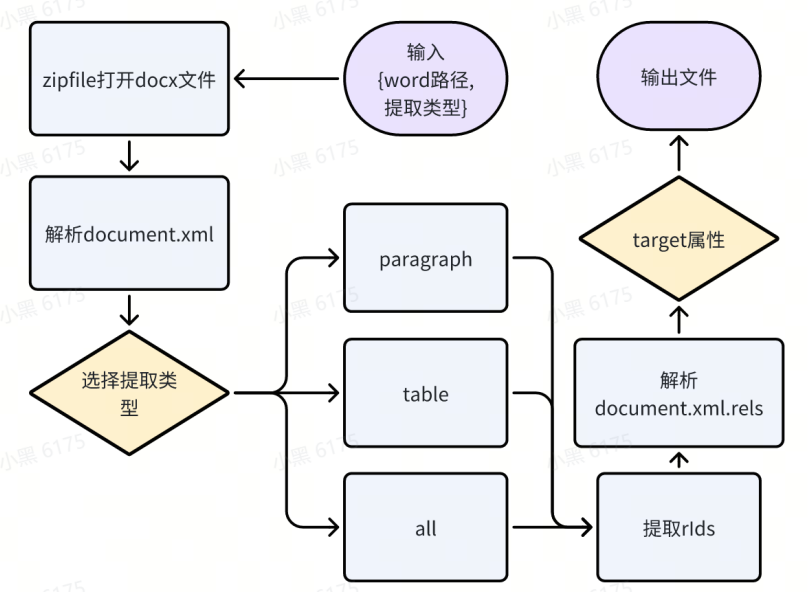
- 使用 zipfile 库解压并打开 Word 文档,得到一个包含文档内容的文件夹,以对象的形式保存到内存中。
- 使用 XML 解析库(如 Python 中的 ElementTree 或 lxml)来解析 Word 文档的 XML 结构。
- 读取内存中的 document.xml 文件对象的 XML,并用 ElementTree 解析。
- 在 XML 中查找包含图像连接信息的标签,通常是 <a:blip> 或者 <v:imagedata> 下的 r:embed,r 表示的就是 <Relationships> 标签。
- 根据从 document.xml 中取到的 rId,即可以获取保存在 document.xml.rels 文件中的图像文件路径。
- 在上述过程中,我们可以对提取 rId 的过程进行加工,例如在提取时,进行对其他标签的判断,比如判断文本标签 w:t 是否与你想要的文本匹配,即可以获取到想要的满足特定条件的图片。
流程图
Demo
import zipfile
import xml.etree.ElementTree as ET
from io import BytesIO

class ImgProcessor:
    def __init__(self, word_path, ele_type):
        """
        初始化 ImgProcessor 对象。

        Args:
            word_path (str): Word 文件的路径。
            ele_type (str): 要处理的元素类型,可以是 'paragraph'、'table' 或 'all'。

        Returns:
            None
        """
        self.word_path = word_path
        self.element_type = ele_type
        self.imgs_IO = self.get_all_pictures()

    def get_all_pictures(self):
        """
        获取 Word 文档中指定类型元素的所有图片。

        Returns:
            list: 包含元组的列表,每个元组包含图片的 BytesIO 对象和文件扩展名。
        """
        with zipfile.ZipFile(self.word_path, 'r') as zip_ref:
            r_ids = self.extract_relationship_ids(zip_ref)
            imgs = self.retrieve_images(zip_ref, r_ids)
        return imgs

    def extract_relationship_ids(self, zip_file):
        """
        从 Word 文档中提取关系 ID。

        Args:
            zip_file: ZipFile 对象,用于解压 Word 文档。

        Returns:
            list: 包含关系 rId 的列表。
        """
        r_ids = []
        ns = {"w": "http://schemas.openxmlformats.org/wordprocessingml/2006/main"}

        root = ET.fromstring(zip_file.read('word/document.xml'))
        root = root.find(".//w:body", namespaces=ns)

        if self.element_type == "paragraph":
            elements = root.findall("./w:p", namespaces=ns)
        elif self.element_type == "table":
            elements = root.findall("./w:tbl", namespaces=ns)
        elif self.element_type == "all":
            elements = root.findall("./*")
        else:
            elements = []

        for element in elements:
            _attribute = []
            imagedata_elements = element.findall(".//v:imagedata", namespaces={"v": "urn:schemas-microsoft-com:vml"})

            if imagedata_elements:
                _attribute = [
                    imagedata_element.get("{http://schemas.openxmlformats.org/officeDocument/2006/relationships}id")
                    for imagedata_element in imagedata_elements]
            elif not _attribute:
                blip_elements = element.findall(".//a:blip", namespaces={
                    "a": "http://schemas.openxmlformats.org/drawingml/2006/main"})
                if blip_elements:
                    _attribute = [blip_element.get(
                        "{http://schemas.openxmlformats.org/officeDocument/2006/relationships}embed") for blip_element
                        in blip_elements]

            if _attribute:
                r_ids.extend(_attribute)
        return r_ids

    def retrieve_images(self, zip_ref, r_ids):
        """
        从 Word 文档中检索指定关系 ID 的图片。

        Args:
            zip_ref: ZipFile 对象,用于解压 Word 文档。
            r_ids (list): 包含关系 ID 的列表。

        Returns:
            list: 包含元组的列表,每个元组包含图片的 BytesIO 对象和文件扩展名。
        """
        imgs = []
        root = ET.fromstring(zip_ref.read('word/_rels/document.xml.rels'))
        ns = {'ns': 'http://schemas.openxmlformats.org/package/2006/relationships'}

        for r_id in r_ids:
            for rel in root.findall('.//ns:Relationship', namespaces=ns):
                rel_id = rel.attrib.get('Id')
                rel_type = rel.attrib.get('Type')

                if rel_id == r_id and 'image' in rel_type:
                    rel_target = rel.attrib.get('Target')
                    img_data = zip_ref.read(f"word/{rel_target}")
                    img_io = BytesIO(img_data)
                    imgs.append((img_io, rel_target.split('.')[-1]))
        return imgs

    def to_picture(self, pic_target_path):
        """
        将图片保存到指定目录。

        Args:
            pic_target_path (str): 保存图片的目录路径。

        Returns:
            None
        """
        if pic_target_path[-1] == '\\':
            pic_target_path = pic_target_path[:-1]
        for i, img_IO in enumerate(self.imgs_IO):
            with open(rf'{pic_target_path}\{i}.{img_IO[1]}', 'wb') as pic_wr:
                pic_wr.write(img_IO[0].getvalue())

word_file_path = r'C:\影刀\word图片测试\123.docx'
processor = ImgProcessor(word_file_path, 'all')
processor.to_picture(r'C:\影刀\word图片测试\保存')
全部评论(1)
最新
发布评论
评论


