【即是过客】日常分享008之 批量创建浏览器用户并启用下载询问功能 收藏
收藏
评论
收藏【即是过客】日常分享008之 批量创建浏览器用户并启用下载询问功能

即是过客
2025-07-12 10:24·浏览量:1345即是过客
 影刀专家
影刀专家 影刀认证工程师发布于 2025-07-12 10:21更新于 2025-07-12 10:241345浏览
🌟本期内容:批量创建浏览器用户并启用下载询问功能
✨下期内容预告:浏览器多用户环境下自动配置启用扩展
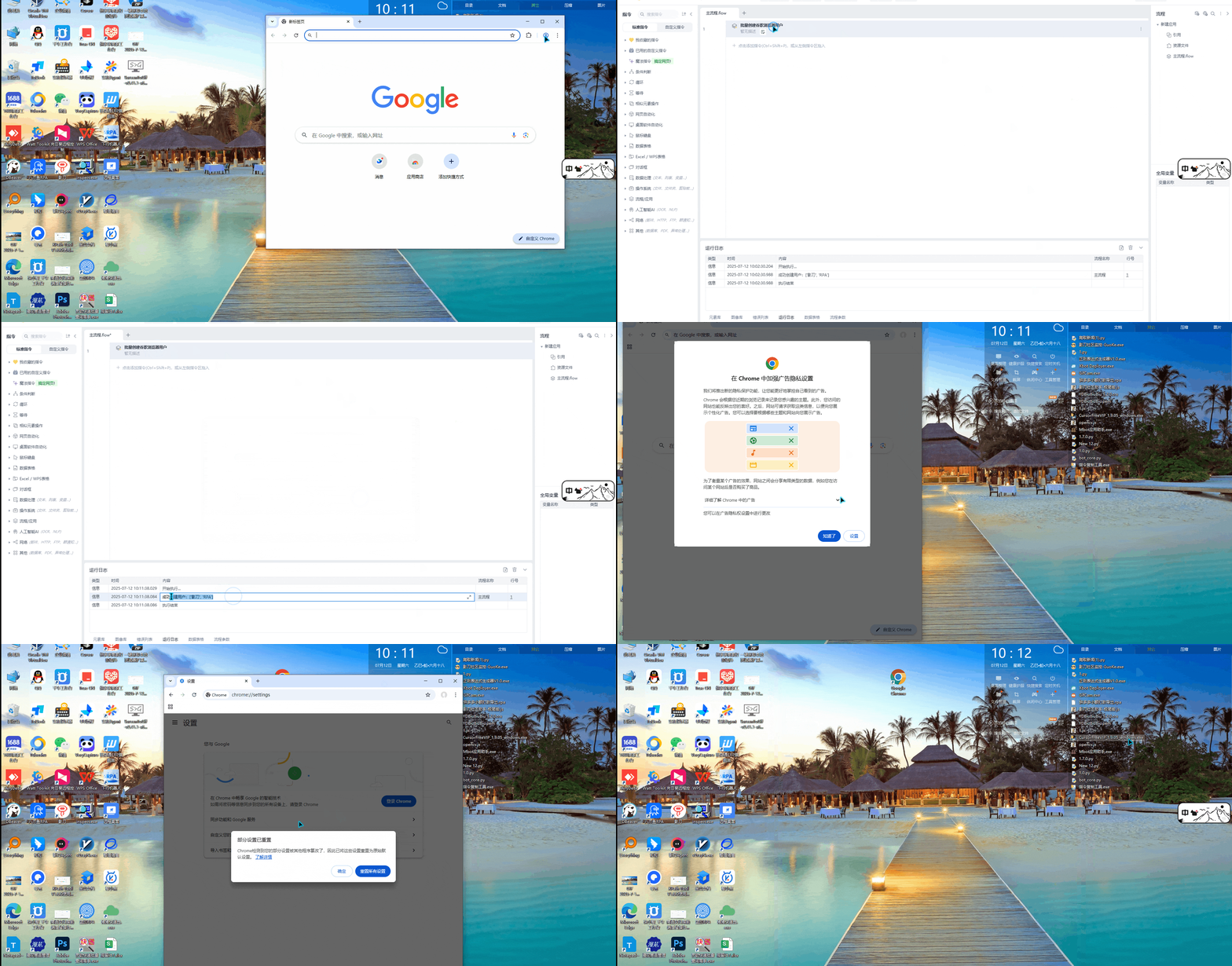
使用示例:
输入变量(用户名列表):["影刀","RPA"]
高级设置选择是否开启下载询问功能:是
python代码:
# 使用提醒:
# 1. xbot包提供软件自动化、数据表格、Excel、日志、AI等功能
# 2. package包提供访问当前应用数据的功能,如获取元素、访问全局变量、获取资源文件等功能
# 3. 当此模块作为流程独立运行时执行main函数
# 4. 可视化流程中可以通过"调用模块"的指令使用此模块

import xbot
from xbot import print, sleep
from .import package
from .package import variables as glv
import os
import shutil
import json
import psutil
from pathlib import Path

from typing import *
try:
    from xbot.app.logging import trace as print
except:
    from xbot import print


def create_chrome_users(用户名列表, 是否启用下载路径询问=True):
    """
    title: 批量创建谷歌浏览器用户
    description: 为谷歌浏览器批量创建多个用户配置文件,每个用户都有独立的浏览器环境。根据 % 用户名列表 % 参数中的用户名列表创建对应数量的用户。通过 % 是否启用下载路径询问 % 参数控制是否启用下载路径询问。
    inputs:
        - 用户名列表 (list): 用户名列表,eg: "['张三', '李四', '王五']"
        - 是否启用下载路径询问 (bool): 是否启用下载路径询问,eg: "True"
    outputs:
        - created_users (list): 成功创建的用户列表,eg: "['张三', '李四', '王五']"
    """

    # 检查输入有效性
    if not isinstance(用户名列表, list) or len(用户名列表) == 0:
        raise ValueError("用户名列表不能为空,必须提供至少一个用户名")

    # 验证用户名列表
    for name in 用户名列表:
        if not isinstance(name, str) or not name.strip():
            raise ValueError("用户名列表中包含无效的用户名")

    if not isinstance(是否启用下载路径询问, bool):
        raise ValueError("下载路径询问状态必须为布尔值")

    def _get_chrome_data_dir():
        """获取Chrome用户数据目录"""
        import platform
        system = platform.system()

        if system == "Windows":
            return os.path.join(os.environ.get('LOCALAPPDATA', ''), 'Google', 'Chrome', 'User Data')
        elif system == "Darwin":  # macOS
            return os.path.expanduser('~/Library/Application Support/Google/Chrome')
        elif system == "Linux":
            return os.path.expanduser('~/.config/google-chrome')
        else:
            raise OSError("不支持的操作系统")

    def _get_existing_profiles(chrome_data_dir):
        """获取现有的Profile列表"""
        existing_profiles = []
        try:
            for item in os.listdir(chrome_data_dir):
                item_path = os.path.join(chrome_data_dir, item)
                if os.path.isdir(item_path):
                    if item == "Default" or item.startswith("Profile "):
                        existing_profiles.append(item)
            return existing_profiles
        except Exception as e:
            print(f"获取现有Profile列表失败: {str(e)}")
            return []

    def _get_next_profile_name(chrome_data_dir):
        """获取下一个可用的Profile名称"""
        existing_profiles = _get_existing_profiles(chrome_data_dir)
        print(f"现有Profile: {existing_profiles}")

        # 从Profile 1开始查找
        profile_num = 1
        while True:
            profile_name = f"Profile {profile_num}"
            if profile_name not in existing_profiles:
                return profile_name
            profile_num += 1

    def _create_user_profile(chrome_data_dir, profile_name, display_name, 是否启用下载路径询问):
        """创建单个用户配置文件"""
        profile_dir = os.path.join(chrome_data_dir, profile_name)

        print(f"开始创建用户配置文件: {profile_dir}")

        if os.path.exists(profile_dir):
            raise FileExistsError(f"用户配置文件 {profile_name} 已存在")

        # 创建配置文件夹
        try:
            os.makedirs(profile_dir, exist_ok=True)
            print(f"成功创建目录: {profile_dir}")
        except Exception as e:
            raise RuntimeError(f"创建配置文件夹失败: {str(e)}")

        # 创建基本的配置文件
        preferences = {
            "profile": {
                "name": display_name,
                "avatar_index": 0,
                "is_using_default_avatar": True,
                "is_using_default_name": True
            },
            "browser": {
                "check_default_browser": False,
                "has_seen_welcome_page": True
            },
            "homepage": "chrome://newtab/",
            "homepage_is_newtabpage": True,
            "session": {
                "restore_on_startup": 1
            },
            "bookmark_bar": {
                "show_on_all_tabs": True
            },
            "sync": {
                "suppress_start": True
            }
        }

        # 配置扩展插件设置
        preferences["extensions"] = {
            "alerts": {
                "initialized": True
            },
            "chrome_url_overrides": {},
            "commands": {},
            "last_chrome_version": "120.0.0.0",
            "settings": {}
        }

        preferences["extensions_ui"] = {
            "developer_mode": False
        }

        # 配置下载设置
        download_dir = os.path.join(os.path.expanduser("~"), "Downloads")
        if 是否启用下载路径询问:
            preferences["download"] = {
                "prompt_for_download": True,
                "directory_upgrade": True,
                "default_directory": download_dir
            }
        else:
            preferences["download"] = {
                "prompt_for_download": False,
                "directory_upgrade": False,
                "default_directory": download_dir
            }

        # 配置其他设置
        preferences["plugins"] = {
            "removed_old_component_pepper_flash_settings": True
        }

        preferences["first_run_tabs"] = ["chrome://newtab/"]

        # 写入Preferences文件
        try:
            preferences_path = os.path.join(profile_dir, 'Preferences')
            with open(preferences_path, 'w', encoding='utf-8') as f:
                json.dump(preferences, f, indent=2, ensure_ascii=False)
            print(f"成功创建Preferences文件: {preferences_path}")
        except Exception as e:
            raise RuntimeError(f"创建Preferences文件失败: {str(e)}")

        # 创建必要的子文件夹
        try:
            folders_to_create = [
                'Extensions',
                'Local Extension Settings',
                'Sync Extension Settings',
                'IndexedDB',
                'Local Storage',
                'Session Storage',
                'databases',
                'GPUCache'
            ]

            for folder in folders_to_create:
                folder_path = os.path.join(profile_dir, folder)
                os.makedirs(folder_path, exist_ok=True)

            print(f"成功创建所有必要子文件夹")
        except Exception as e:
            print(f"创建子文件夹时出现警告: {str(e)}")

        return profile_name

    def _update_local_state(chrome_data_dir, profile_info_list):
        """更新Local State文件以注册新用户"""
        local_state_path = os.path.join(chrome_data_dir, 'Local State')
        print(f"更新Local State文件: {local_state_path}")

        if os.path.exists(local_state_path):
            try:
                with open(local_state_path, 'r', encoding='utf-8') as f:
                    local_state = json.load(f)
                print("成功读取现有Local State文件")
            except Exception as e:
                print(f"读取Local State文件失败,创建新文件: {str(e)}")
                local_state = {}
        else:
            print("Local State文件不存在,创建新文件")
            local_state = {}

        # 确保profile节点存在
        if 'profile' not in local_state:
            local_state['profile'] = {}
        if 'info_cache' not in local_state['profile']:
            local_state['profile']['info_cache'] = {}

        # 添加新用户信息
        for profile_name, display_name in profile_info_list:
            local_state['profile']['info_cache'][profile_name] = {
                "active_time": 0,
                "avatar_icon": "chrome://theme/IDR_PROFILE_AVATAR_0",
                "background_apps": False,
                "is_using_default_avatar": True,
                "is_using_default_name": True,
                "name": display_name,
                "user_name": ""
            }
            print(f"添加用户到Local State: {profile_name} - {display_name}")

        # 写回Local State文件
        try:
            with open(local_state_path, 'w', encoding='utf-8') as f:
                json.dump(local_state, f, indent=2, ensure_ascii=False)
            print("成功更新Local State文件")
        except Exception as e:
            print(f"更新Local State文件失败: {str(e)}")

    # 获取Chrome数据目录
    chrome_data_dir = _get_chrome_data_dir()
    print(f"Chrome数据目录: {chrome_data_dir}")

    if not os.path.exists(chrome_data_dir):
        raise FileNotFoundError(f"未找到Chrome用户数据目录: {chrome_data_dir},请确保已安装Chrome浏览器")

    # 检查目录权限
    if not os.access(chrome_data_dir, os.W_OK):
        raise PermissionError(f"没有写入权限: {chrome_data_dir}")

    created_users = []
    profile_info_list = []

    print(f"开始批量创建 {len(用户名列表)} 个用户")

    try:
        # 批量创建用户
        for i, display_name in enumerate(用户名列表):
            print(f"\n正在创建第 {i+1} 个用户: {display_name}")

            try:
                # 获取下一个可用的Profile名称
                profile_name = _get_next_profile_name(chrome_data_dir)
                print(f"分配Profile名称: {profile_name}")

                _create_user_profile(chrome_data_dir, profile_name, display_name, 是否启用下载路径询问)
                created_users.append(display_name)
                profile_info_list.append((profile_name, display_name))

                download_status = "已启用" if 是否启用下载路径询问 else "已禁用"
                print(f"✓ 成功创建用户: {display_name}")
                print(f"  - Profile: {profile_name}")
                print(f"  - 下载路径询问: {download_status}")

            except Exception as e:
                print(f"✗ 创建用户 {display_name} 失败: {str(e)}")
                continue

        # 更新Local State文件
        if profile_info_list:
            print(f"\n更新Local State文件,注册 {len(profile_info_list)} 个用户")
            _update_local_state(chrome_data_dir, profile_info_list)

        download_status = "启用" if 是否启用下载路径询问 else "禁用"
        print(f"\n🎉 批量创建完成!")
        print(f"✓ 成功创建 {len(created_users)} 个用户: {created_users}")
        print(f"✓ 下载路径询问默认: {download_status}")
        print(f"📌 提示:如果Chrome正在运行,请重启Chrome浏览器以查看新创建的用户")

        return created_users

    except Exception as e:
        raise RuntimeError(f"批量创建用户失败: {str(e)}")
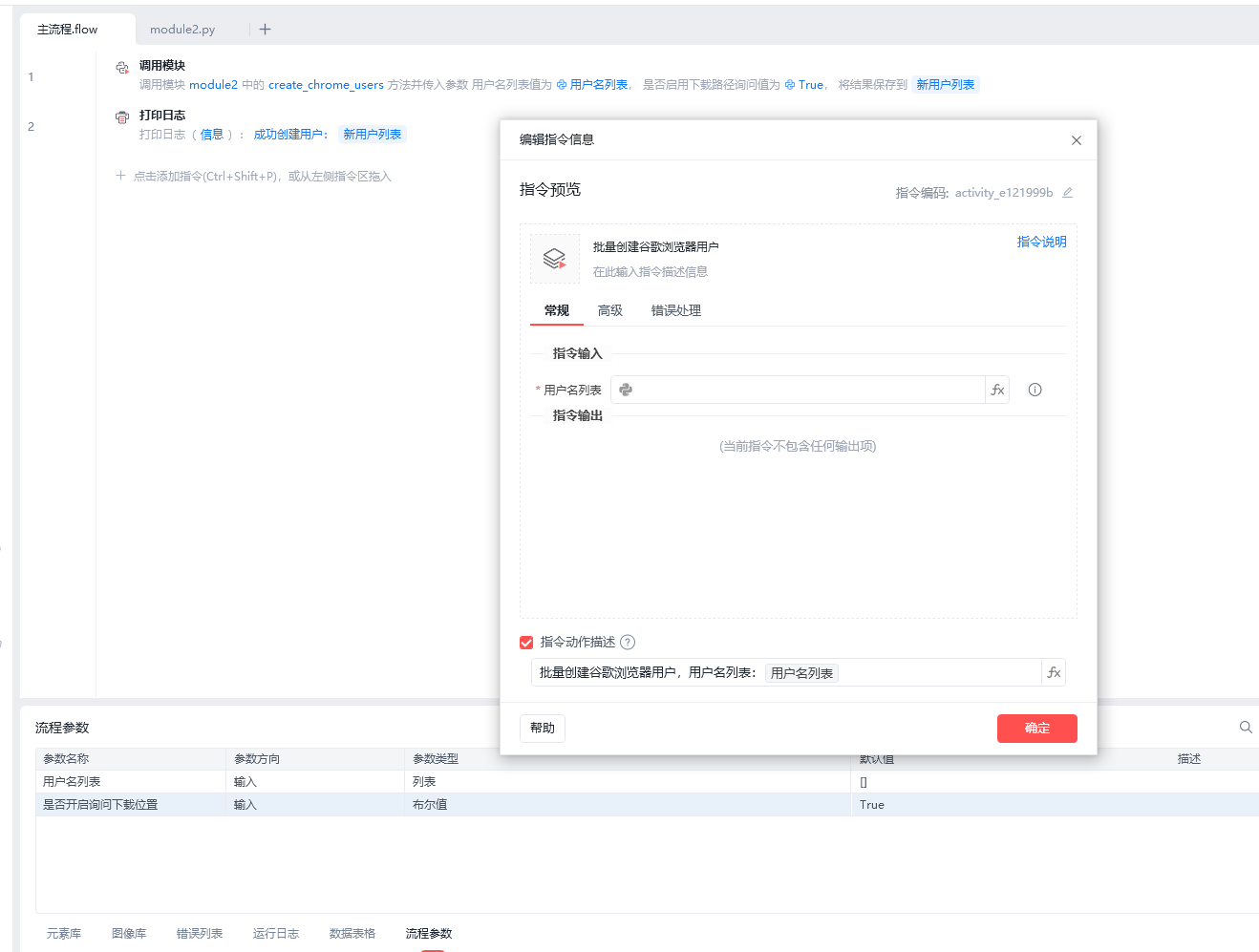
流程参数如图:
收藏14全部评论(1)
最新
发布评论
评论


