【即是过客】日常分享012之 将表格指定区域内每个单元格中的指定文本改成指定颜色,支持EXCEL / WPS 收藏
收藏
评论
收藏【即是过客】日常分享012之 将表格指定区域内每个单元格中的指定文本改成指定颜色,支持EXCEL / WPS

即是过客
2025-08-17 17:35·浏览量:1913即是过客
 影刀专家
影刀专家 影刀认证工程师发布于 2025-08-17 12:24更新于 2025-08-17 17:351913浏览
一句话总结:获取当前激活的Excel/WPS表格,将指定区域内每个单元格中的指定文本改成指定颜色
示例:
原内容:
更改后:
同一个单元格内不同文本指定不同颜色
演示视频:
指令流程:
PYTHON代码:
# 使用提醒:
# 1. xbot包提供软件自动化、数据表格、Excel、日志、AI等功能
# 2. package包提供访问当前应用数据的功能,如获取元素、访问全局变量、获取资源文件等功能
# 3. 当此模块作为流程独立运行时执行main函数
# 4. 可视化流程中可以通过"调用模块"的指令使用此模块

import xbot
from xbot import print, sleep
from .import package
from .package import variables as glv

import win32com.client
import time

from typing import *

def change_text_color_in_excel(target_text, color_name, range_address=None):

    # 检查输入参数
    if not isinstance(target_text, str) or not target_text:
        raise ValueError("目标文本不能为空")

    if not isinstance(color_name, str) or not color_name:
        raise ValueError("颜色名称不能为空")

    # 颜色名称映射到RGB值
    color_map = {
        "red": 255,                    # 红色
        "blue": 16711680,              # 蓝色
        "green": 65280,                # 绿色
        "black": 0,                    # 黑色
        "white": 16777215,             # 白色
        "yellow": 65535,               # 黄色
        "purple": 8388736,             # 紫色
        "orange": 42495,               # 橙色
        "pink": 13408767,              # 粉色
        "gray": 8421504,               # 灰色
        "darkblue": 8388608,           # 深蓝色
        "darkred": 128,                # 深红色
        "darkgreen": 32768,            # 深绿色
        "lightblue": 16759295,         # 浅蓝色
        "lightred": 16744703,          # 浅红色
        "lightgreen": 13434828,        # 浅绿色
    }

    # 获取颜色代码
    color_code = color_map.get(color_name.lower())
    if color_code is None:
        raise ValueError(f"不支持的颜色名称: {color_name}。支持的颜色有: {', '.join(color_map.keys())}")

    # 尝试使用VBA方法修改文本颜色
    try:
        result = change_text_color_with_vba(target_text, color_code, range_address)
        return result
    except Exception as e:
        print(f"VBA方法失败: {str(e)}")
        # 尝试使用备用方法
        try:
            result = change_text_color_fallback(target_text, color_code, range_address)
            return result
        except Exception as e2:
            raise Exception(f"所有方法都失败: {str(e2)}")

def change_text_color_with_vba(target_text, color_code, range_address=None):
    """使用VBA方法修改文本颜色"""
    try:
        # 连接到Excel
        excel = win32com.client.GetActiveObject("Excel.Application")
        print("已连接到Excel应用")

        # 获取当前工作簿和工作表
        workbook = excel.ActiveWorkbook
        worksheet = excel.ActiveSheet
        print(f"当前工作表: {worksheet.Name}")

        # 确定要处理的区域
        range_expr = f"Range(\"{range_address}\")" if range_address else "Selection"
        print(f"处理区域: {range_expr}")

        # 创建VBA代码
        vba_code = f"""
        Sub ChangeTextColor()
            Dim rng As Range
            Dim cell As Range
            Dim pos As Integer
            Dim textToFind As String
            Dim colorValue As Long
            Dim foundCount As Integer

            textToFind = "{target_text}"
            colorValue = {color_code}
            foundCount = 0

            Set rng = {range_expr}

            For Each cell In rng
                If Not IsEmpty(cell.Value) Then
                    pos = InStr(1, cell.Value, textToFind)
                    Do While pos > 0
                        cell.Characters(pos, Len(textToFind)).Font.Color = colorValue
                        foundCount = foundCount + 1
                        pos = InStr(pos + Len(textToFind), cell.Value, textToFind)
                    Loop
                End If
            Next cell

        End Sub
        """

        print("准备执行VBA代码...")

        # 检查是否可以访问VBProject
        try:
            vbproject = workbook.VBProject
            print("成功访问VBProject")
        except Exception as e:
            print(f"无法访问VBProject: {str(e)}")
            print("请确保Excel信任访问VBA项目对象模型。")
            print("在Excel中,转到'文件' > '选项' > '信任中心' > '信任中心设置' > '宏设置',勾选'信任访问VBA项目对象模型'")
            raise Exception("无法访问VBA项目,请检查Excel安全设置")

        # 添加VBA模块并执行
        try:
            excelmodule = workbook.VBProject.VBComponents.Add(1)  # 1 = vbext_ct_StdModule
            excelmodule.CodeModule.AddFromString(vba_code)
            excel.Run("ChangeTextColor")
            workbook.VBProject.VBComponents.Remove(excelmodule)
            print("VBA代码执行成功")
            return "成功修改文本颜色"
        except Exception as e:
            print(f"执行VBA代码失败: {str(e)}")
            raise e

    except Exception as e:
        print(f"VBA方法出错: {str(e)}")
        raise e

def change_text_color_fallback(target_text, color_code, range_address=None):
    """备用方法:使用COM接口直接修改文本颜色"""
    try:
        # 连接到Excel
        excel = win32com.client.GetActiveObject("Excel.Application")
        worksheet = excel.ActiveSheet

        # 确定要处理的区域
        if range_address:
            target_range = worksheet.Range(range_address)
        else:
            target_range = excel.Selection

        # 计数器
        modified_cells = 0

        # 处理选定区域
        if target_range.Count == 1:
            if _modify_cell_text_color(target_range, target_text, color_code):
                modified_cells += 1
        else:
            for cell in target_range:
                if _modify_cell_text_color(cell, target_text, color_code):
                    modified_cells += 1

        return f"成功修改了{modified_cells}个单元格中的文本颜色"
    except Exception as e:
        raise Exception(f"备用方法失败: {str(e)}")

def _modify_cell_text_color(cell, target_text, color_code):
    """尝试直接修改单元格中特定文本的颜色"""
    try:
        # 获取单元格的值
        if cell.Value is None:
            return False

        cell_value = str(cell.Value)

        # 如果单元格不包含目标文本,直接返回
        if target_text not in cell_value:
            return False

        # 尝试使用Characters属性修改文本颜色
        try:
            # 查找所有目标文本的位置
            start_pos = 0
            while True:
                start_pos = cell_value.find(target_text, start_pos)
                if start_pos == -1:
                    break

                # 修改文本颜色
                cell.Characters(start_pos+1, len(target_text)).Font.Color = color_code

                # 移动到下一个位置
                start_pos += len(target_text)

            return True
        except Exception as e:
            print(f"直接修改文本颜色失败: {str(e)}")
            return False
    except Exception as e:
        print(f"处理单元格时出错: {str(e)}")
        return False
指令信息:
流程参数
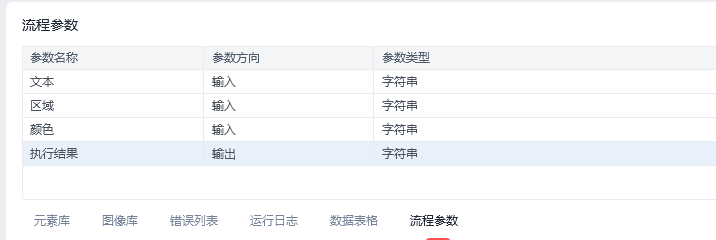

颜色改成下拉项:
红色
蓝色
绿色
黑色
白色
黄色
紫色
橙色
粉色
灰色
深蓝色
深红色
深绿色
浅蓝色
浅红色
浅绿色全部评论(1)
最新
发布评论
评论


