《python代码分享1》如何成为社区扛把子中的一员?下面这个代码是你成功的第一步【影刀社区监听】 收藏
评论
收藏《python代码分享1》如何成为社区扛把子中的一员?下面这个代码是你成功的第一步【影刀社区监听】

Code拾光者(小新)
2025-08-19 23:12·浏览量:643Code拾光者(小新)
 影刀专家
 影刀认证工程师发布于 2025-08-19 23:02更新于 2025-08-19 23:12643浏览

代码如下:
import tkinter as tk
import webbrowser
import os
import subprocess
import requests
import threading
import time
from datetime import datetime

class HyperlinkManager:
    """用于管理Tkinter文本组件中的超链接"""
    def __init__(self, text, browser_path=None):
        self.text = text
        self.browser_path = browser_path  # 存储浏览器路径
        self.text.tag_config("hyper", foreground="blue", underline=1)
        self.text.tag_bind("hyper", "<Enter>", self._enter)
        self.text.tag_bind("hyper", "<Leave>", self._leave)
        self.text.tag_bind("hyper", "<Button-1>", self._click)
        self.links = {}

    def _enter(self, event):
        self.text.config(cursor="hand2")

    def _leave(self, event):
        self.text.config(cursor="")

    def _click(self, event):
        # 获取点击位置的索引
        index = self.text.index(f"@%s,%s" % (event.x, event.y))
        # 检查该位置的所有标签
        for tag in self.text.tag_names(index):
            if tag.startswith("link_"):
                url = self.links[tag]
                try:
                    # 如果指定了浏览器且路径有效,则使用指定浏览器
                    if self.browser_path and os.path.exists(self.browser_path):
                        # 使用subprocess确保浏览器启动
                        subprocess.Popen([self.browser_path, url])
                    else:
                        # 否则使用默认浏览器
                        webbrowser.open_new(url)
                except Exception as e:
                    print(f"打开链接时出错: {e}")
                return

    def add(self, text, url):
        """添加超链接"""
        tag = f"link_{len(self.links)}"
        self.links[tag] = url
        self.text.insert(tk.END, text, ("hyper", tag))
        return tag

class LinkWindow:
    """链接显示窗口类"""
    def __init__(self, links_dict, browser_path=None):
        self.root = tk.Toplevel()
        self.root.title("最新问答")

        # 创建文本组件用于显示超链接
        self.text = tk.Text(self.root, bg="#f0f0f0", relief=tk.FLAT, height=2, font=("SimHei", 10))
        self.text.pack(fill=tk.X, padx=10, pady=10, expand=True)

        # 创建超链接管理器
        hyperlink = HyperlinkManager(self.text, browser_path)

        # 添加所有链接
        link_items = list(links_dict.items())
        for i, (text_str, url) in enumerate(link_items):
            hyperlink.add(str(text_str), str(url))
            if i < len(link_items) - 1:
                self.text.insert(tk.END, " |  ")

        # 禁止编辑文本
        self.text.config(state=tk.DISABLED)

        # 添加关闭按钮
        close_btn = tk.Button(self.root, text="关闭", command=self.root.destroy)
        close_btn.pack(pady=5)

        # 窗口设置
        screen_width = self.root.winfo_screenwidth()
        x_position = (screen_width - 600) // 2
        # 计算窗口垂直位置,确保新窗口不会完全覆盖旧窗口
        window_count = len(tk._default_root.winfo_children())
        y_position = 30 * window_count  # 每个新窗口向下偏移30像素
        self.root.geometry(f"600x100+{x_position}+{y_position}")
        self.root.resizable(False, False)
        self.root.attributes("-topmost", True)

class QuestionMonitor:
    """问答监控器类"""
    def __init__(self, browser_path=None, check_interval=5):
        self.browser_path = browser_path
        self.check_interval = check_interval  # 检查间隔(秒)
        self.last_question_uuid = None  # 记录最后一次显示的问答UUID
        self.running = True  # 运行状态标志
        self.lock = threading.Lock()  # 线程锁

        # 创建一个隐藏的主窗口,用于Tkinter的事件循环
        self.main_root = tk.Tk()
        self.main_root.withdraw()  # 隐藏主窗口

        # 启动监控线程
        self.monitor_thread = threading.Thread(target=self.monitor_loop, daemon=True)
        self.monitor_thread.start()

    def get_question_links(self):
        """获取最新问答链接"""
        try:
            headers = {
                "accept": "*/*",
                "accept-language": "zh-CN,zh;q=0.9",
                "browser_uuid": "de907cc3-0947-481e-b156-14debb39251d",
                "origin": "https://www.yingdao.com",
                "referer": "https://www.yingdao.com/",
                "sec-ch-ua": "\"Not?A_Brand\";v=\"99\", \"Chromium\";v=\"130\"",
                "sec-ch-ua-mobile": "?0",
                "sec-ch-ua-platform": "\"Windows\"",
                "sec-fetch-dest": "empty",
                "sec-fetch-mode": "cors",
                "sec-fetch-site": "same-site",
                "user-agent": "Mozilla/5.0 (Windows NT 10.0; Win64; x64) AppleWebKit/537.36 (KHTML, like Gecko) Chrome/130.0.0.0 Safari/537.36 QuarkPC/4.3.2.474"
            }
            url = "https://api.yingdao.com/api/noauth/v1/sns/forum/question/query"
            params = {
                "page": "1",
                "size": "20",
                "tags": "问答",
                "sort": "createTime"
            }
            response = requests.get(url, headers=headers, params=params, timeout=10)
            response.raise_for_status()  # 抛出HTTP错误
            data = response.json()

            if data.get("success") and data.get("data"):
                return data["data"]
            return None

        except Exception as e:
            print(f"获取问答时出错: {e}")
            return None

    def show_new_questions(self, questions):
        """显示新的问答"""
        if not questions:
            return

        # 只显示最新的且未显示过的问答
        latest_question = questions[0]
        with self.lock:
            if latest_question["uuid"] != self.last_question_uuid:
                self.last_question_uuid = latest_question["uuid"]
                links_dict = {
                    latest_question["title"]: f"https://www.yingdao.com/community/detaildiscuss?id={latest_question['uuid']}"
                }

                # 在主线程中创建并显示窗口
                self.main_root.after(0, lambda: LinkWindow(links_dict, self.browser_path))
                print(f"[{datetime.now()}] 显示新问答: {latest_question['title']}")

    def monitor_loop(self):
        """监控循环,定时检查新问答"""
        while self.running:
            try:
                # 获取最新问答
                questions = self.get_question_links()

                # 检查并显示新问答
                if questions:
                    self.show_new_questions(questions)

                # 等待下一次检查
                for _ in range(self.check_interval):
                    if not self.running:
                        break
                    time.sleep(1)

            except Exception as e:
                print(f"监控循环出错: {e}")
                time.sleep(self.check_interval)

    def run(self):
        """运行主事件循环"""
        self.main_root.mainloop()

    def stop(self):
        """停止监控"""
        self.running = False

if __name__ == "__main__":
    # 浏览器路径(请根据实际情况修改)
    browser_path = None  # 设为None则使用默认浏览器

    # 创建并运行监控器,检查间隔5秒
    monitor = QuestionMonitor(browser_path=browser_path, check_interval=5)
    try:
        monitor.run()
    except KeyboardInterrupt:
        monitor.stop()
1、建议使用本地python库运行,这样你的影刀才可以空出来
2、代码说明
不是默认就写上浏览器程序文件路径,比如:
browser_path = r"D:\Programs\Quark\quark.exe"

3、使用条件
①安装了本地python解析器,并配置号系统环境
②在本地python安装了requests 库

4、运行办法
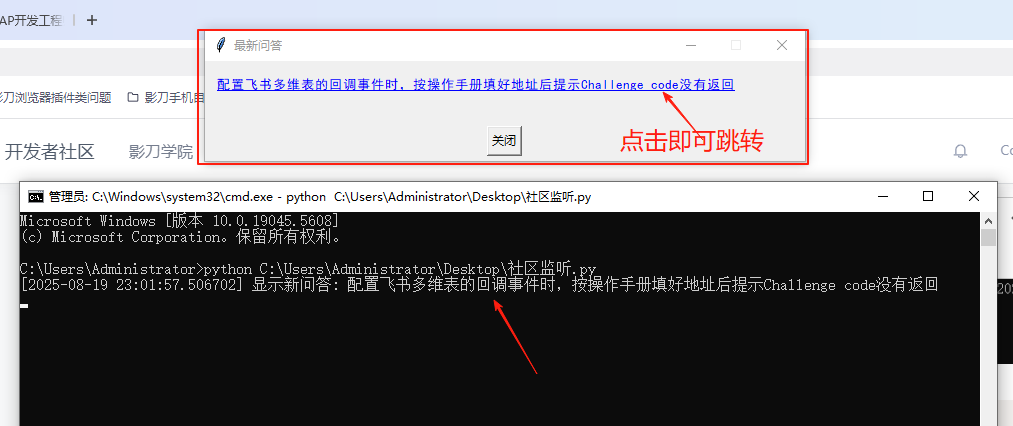
在cmd命令提示符运行:python 这个py文件的路径
例子:python C:\Users\Administrator\Desktop\社区监听.py
收藏7全部评论(1)
最新
发布评论
评论