用篡改猴脚本给个人中心的收藏和发帖加上搜索功能! 收藏
收藏
评论
收藏用篡改猴脚本给个人中心的收藏和发帖加上搜索功能!
狼
2025-10-12 22:11·浏览量:886
狼
狼辛
 影刀中级开发者
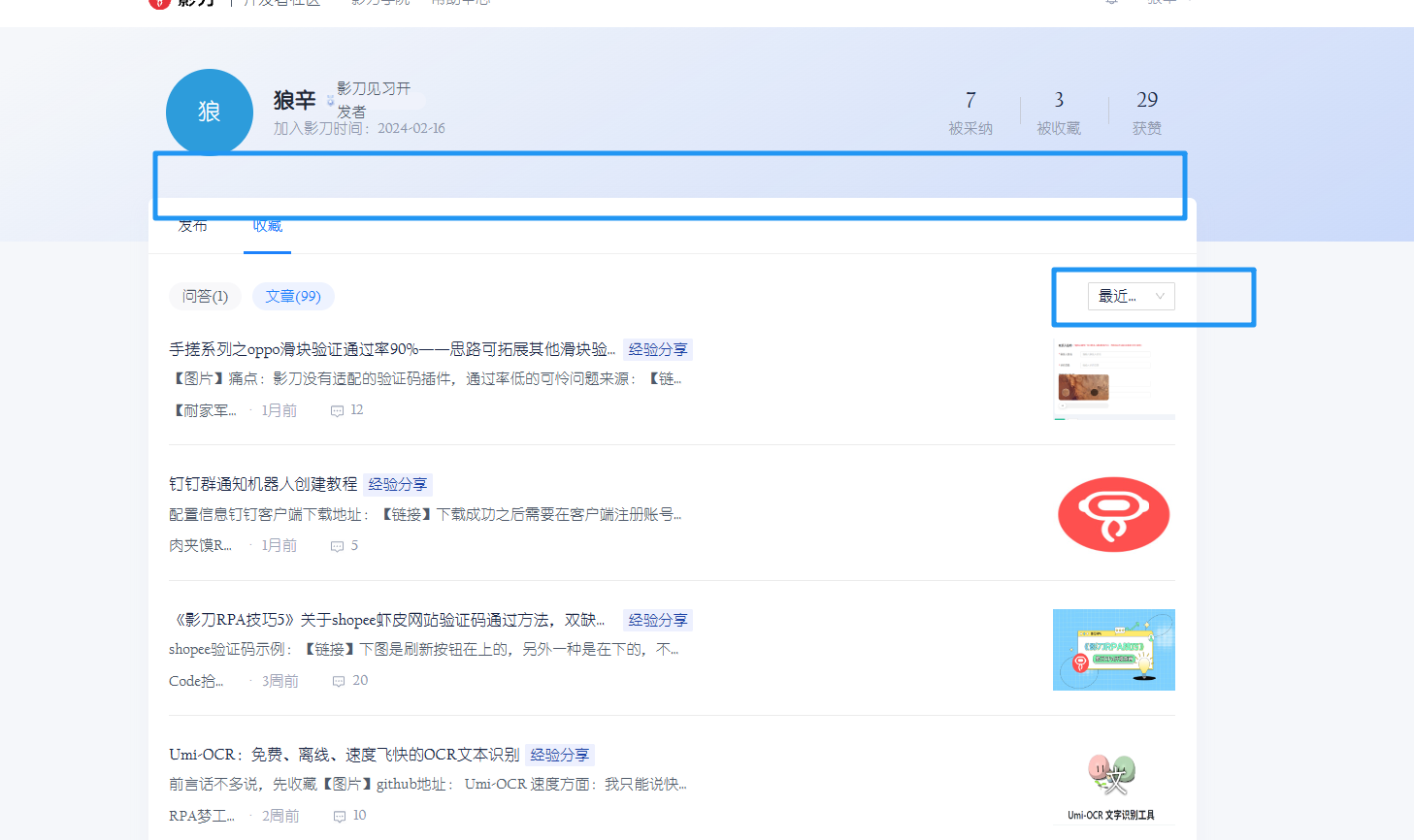 由于本人有囤粮习惯,收藏了很多貌似未来用得上的文章,但真正需要找的时候发现两个痛点!:
1.每页只显示10个帖子,要手动点"查看更多"才能往下找.但我收藏太多了,找不过来.
2.没有关键词搜索!!!!!!!!!忍不了啊啊啊啊,我得按ctrl+f来搜索关键词再一个个去找.
为了解决以上痛点,我用trae ide 的glm-4.6模型写了个篡改猴脚本给网页增加了个搜索框和自动展开:
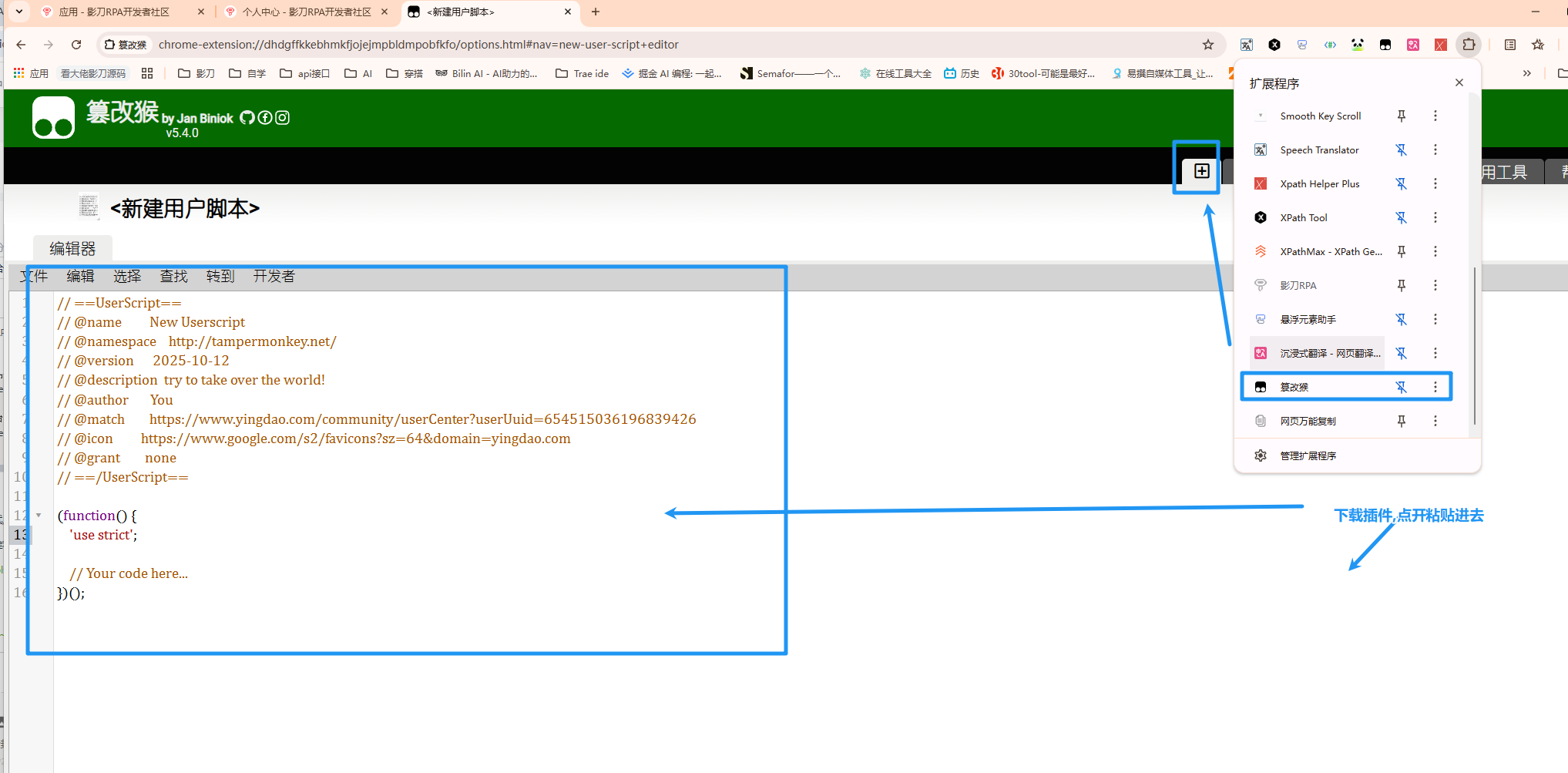
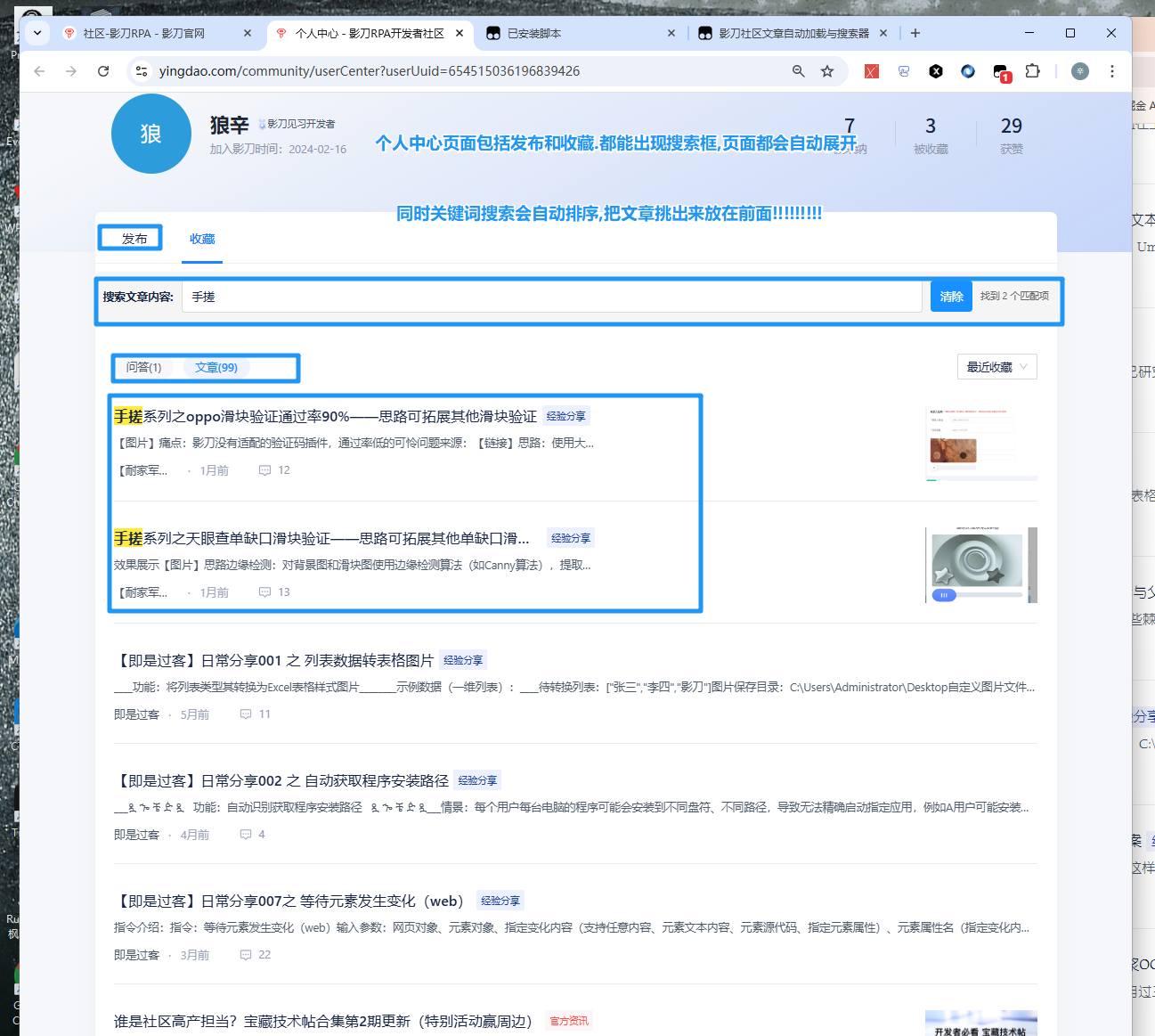 类似于百度搜索的效果.篡改猴的js脚本如下,复制粘贴即可:
// ==UserScript==
// @name 影刀社区文章自动加载与搜索器
// @namespace http://tampermonkey.net/
// @version 2.0
// @description 自动加载影刀社区用户中心的所有文章,并提供搜索功能,无需手动点击"查看更多"
// @author You
// @match https://www.yingdao.com/community/userCenter?userUui*
// @grant none
// ==/UserScript==
(function() {
'use strict';
// 全局变量,用于跟踪搜索框是否已存在
let 搜索框已存在 = false;
let 自动加载进行中 = false;
// 等待页面加载完成
window.addEventListener('load', function() {
console.log('影刀社区文章自动加载与搜索器已启动');
// 延迟执行,确保页面元素完全加载
setTimeout(初始化功能, 1000);
});
// 初始化所有功能
function 初始化功能() {
console.log('开始初始化功能...');
// 先添加搜索框(如果不存在)
添加搜索框();
// 延迟执行自动加载,确保搜索框已创建
setTimeout(() => {
// 然后开始自动加载文章
自动加载所有文章();
}, 500);
}
// 添加搜索框的函数
function 添加搜索框() {
// 检查搜索框是否已存在(使用更可靠的检查方法)
const 已存在的搜索框 = document.getElementById('影刀社区搜索框容器');
if (已存在的搜索框) {
console.log('搜索框已存在,跳过添加');
return;
}
console.log('开始添加搜索框...');
// 查找标签页区域
const 标签页区域 = document.querySelector('.ant-tabs-nav') || document.querySelector('[role="tablist"]');
if (标签页区域) {
console.log('找到标签页区域,开始添加搜索框');
// 创建搜索框容器
const 搜索框容器 = document.createElement('div');
搜索框容器.id = '影刀社区搜索框容器'; // 添加ID以便后续检查
搜索框容器.style.margin = '10px 0';
搜索框容器.style.padding = '10px';
搜索框容器.style.backgroundColor = '#f5f5f5';
搜索框容器.style.borderRadius = '4px';
搜索框容器.style.display = 'flex';
搜索框容器.style.alignItems = 'center';
搜索框容器.style.justifyContent = 'space-between';
// 创建搜索框标签
const 搜索框标签 = document.createElement('label');
搜索框标签.textContent = '搜索文章内容: ';
搜索框标签.style.marginRight = '10px';
搜索框标签.style.fontWeight = 'bold';
// 创建搜索输入框
const 搜索输入框 = document.createElement('input');
搜索输入框.type = 'text';
搜索输入框.placeholder = '输入关键词搜索文章...';
搜索输入框.style.flex = '1';
搜索输入框.style.padding = '8px 12px';
搜索输入框.style.border = '1px solid #d9d9d9';
搜索输入框.style.borderRadius = '4px';
搜索输入框.style.outline = 'none';
搜索输入框.style.fontSize = '14px';
// 创建清除按钮
const 清除按钮 = document.createElement('button');
清除按钮.textContent = '清除';
清除按钮.style.marginLeft = '10px';
清除按钮.style.padding = '8px 12px';
清除按钮.style.backgroundColor = '#1890ff';
清除按钮.style.color = 'white';
清除按钮.style.border = 'none';
清除按钮.style.borderRadius = '4px';
清除按钮.style.cursor = 'pointer';
// 创建搜索结果计数
const 搜索结果计数 = document.createElement('span');
搜索结果计数.style.marginLeft = '10px';
搜索结果计数.style.fontSize = '12px';
搜索结果计数.style.color = '#666';
// 将元素添加到容器
搜索框容器.appendChild(搜索框标签);
搜索框容器.appendChild(搜索输入框);
搜索框容器.appendChild(清除按钮);
搜索框容器.appendChild(搜索结果计数);
// 将搜索框插入到标签页区域后面
标签页区域.parentNode.insertBefore(搜索框容器, 标签页区域.nextSibling);
// 标记搜索框已存在
搜索框已存在 = true;
// 搜索函数
function 搜索文章() {
const 搜索关键词 = 搜索输入框.value.trim().toLowerCase();
let 匹配数量 = 0;
// 获取所有文章项 - 尝试多种选择器
let 所有文章项 = document.querySelectorAll('.list_item___nmNeS');
// 如果在收藏页面,尝试其他选择器
if (所有文章项.length === 0) {
所有文章项 = document.querySelectorAll('a[href*="/community/"]');
// 如果还是找不到,尝试查找包含文章内容的链接
if (所有文章项.length === 0) {
所有文章项 = document.querySelectorAll('div[role="tabpanel"] a');
}
}
console.log(`找到 ${所有文章项.length} 个文章项,开始搜索...`);
console.log('当前页面URL:', window.location.href);
// 遍历所有文章项
所有文章项.forEach((item) => {
const 文章内容 = item.textContent.toLowerCase();
if (搜索关键词 === '' || 文章内容.includes(搜索关键词)) {
// 对于链接元素,需要显示其父容器
let 显示元素 = item;
if (item.tagName === 'A' && item.parentElement) {
显示元素 = item.parentElement;
}
显示元素.style.display = '';
if (搜索关键词 !== '') {
// 高亮匹配的关键词
高亮关键词(显示元素, 搜索关键词);
} else {
// 清除高亮
清除高亮(显示元素);
}
匹配数量++;
} else {
// 对于链接元素,需要隐藏其父容器
let 显示元素 = item;
if (item.tagName === 'A' && item.parentElement) {
显示元素 = item.parentElement;
}
显示元素.style.display = 'none';
// 清除高亮
清除高亮(显示元素);
}
});
// 更新搜索结果计数
搜索结果计数.textContent = 搜索关键词 ? `找到 ${匹配数量} 个匹配项` : '';
console.log(`搜索完成,找到 ${匹配数量} 个匹配项`);
}
// 高亮关键词函数
function 高亮关键词(element, keyword) {
// 先清除之前的高亮
清除高亮(element);
if (!keyword) return;
// 获取所有文本节点
const 节点迭代器 = document.createTreeWalker(
element,
NodeFilter.SHOW_TEXT,
null,
false
);
const 文本节点 = [];
let 节点;
while (节点 = 节点迭代器.nextNode()) {
文本节点.push(节点);
}
// 处理每个文本节点
文本节点.forEach(节点 => {
const 文本 = 节点.nodeValue;
const 小写文本 = 文本.toLowerCase();
const 小写关键词 = keyword.toLowerCase();
if (小写文本.includes(小写关键词)) {
const 正则 = new RegExp(`(${转义正则字符(keyword)})`, 'gi');
const 匹配结果 = 文本.match(正则);
if (匹配结果) {
const 片段 = document.createDocumentFragment();
let 最后索引 = 0;
文本.replace(正则, (匹配, 匹配文本, 偏移量) => {
// 添加匹配前的文本
if (偏移量 > 最后索引) {
片段.appendChild(document.createTextNode(文本.substring(最后索引, 偏移量)));
}
// 添加高亮的匹配文本
const 高亮元素 = document.createElement('span');
高亮元素.style.backgroundColor = '#ffeb3b';
高亮元素.style.fontWeight = 'bold';
高亮元素.textContent = 匹配文本;
片段.appendChild(高亮元素);
最后索引 = 偏移量 + 匹配文本.length;
});
// 添加剩余的文本
if (最后索引 < 文本.length) {
片段.appendChild(document.createTextNode(文本.substring(最后索引)));
}
// 替换原始文本节点
节点.parentNode.replaceChild(片段, 节点);
}
}
});
}
// 清除高亮函数
function 清除高亮(element) {
const 高亮元素 = element.querySelectorAll('span[style*="background-color: rgb(255, 235, 59)"]');
高亮元素.forEach(el => {
const 父节点 = el.parentNode;
父节点.replaceChild(document.createTextNode(el.textContent), el);
父节点.normalize();
});
}
// 转义正则字符函数
function 转义正则字符(string) {
return string.replace(/[.*+?^${}()|[\]\\]/g, '\\$&');
}
// 添加输入事件监听器
搜索输入框.addEventListener('input', 搜索文章);
// 添加清除按钮点击事件
清除按钮.addEventListener('click', function() {
搜索输入框.value = '';
搜索文章();
搜索输入框.focus();
});
// 添加回车键搜索
搜索输入框.addEventListener('keypress', function(e) {
if (e.key === 'Enter') {
搜索文章();
}
});
console.log('搜索框添加成功');
} else {
console.log('未找到标签页区域,无法添加搜索框');
}
}
// 检查当前是否在收藏标签页
function 检查是否在收藏页面() {
// 方法1:检查URL
if (window.location.href.includes('collection') || window.location.href.includes('favorite')) {
return true;
}
// 方法2:检查选中的标签文本
const 选中标签 = document.querySelector('tab[selected="true"]');
if (选中标签 && 选中标签.textContent.includes('收藏')) {
return true;
}
// 方法3:检查页面标题或特定元素
const 标签页列表 = document.querySelectorAll('tab');
for (const 标签 of 标签页列表) {
if (标签.textContent.includes('收藏') && 标签.getAttribute('selected') === 'true') {
return true;
}
}
return false;
}
// 自动加载所有文章的函数
function 自动加载所有文章() {
// 检查是否已经在进行自动加载
if (自动加载进行中) {
console.log('自动加载已在进行中,跳过重复执行');
return;
}
console.log('开始自动加载文章...');
自动加载进行中 = true;
// 查找"查看更多"按钮
const 查看更多按钮 = document.evaluate('//span[normalize-space(text())="查看更多"]', document, null, XPathResult.FIRST_ORDERED_NODE_TYPE, null).singleNodeValue;
if (查看更多按钮) {
console.log('找到"查看更多"按钮,开始自动点击');
// 设置定时器,持续点击"查看更多"按钮,直到没有更多内容
const 点击间隔 = setInterval(function() {
const 当前按钮 = document.evaluate('//span[normalize-space(text())="查看更多"]', document, null, XPathResult.FIRST_ORDERED_NODE_TYPE, null).singleNodeValue;
if (当前按钮 && 当前按钮.style.display !== 'none' && !当前按钮.disabled) {
console.log('点击"查看更多"按钮');
当前按钮.click();
// 等待内容加载
setTimeout(() => {
// 检查是否还有"查看更多"按钮
const 下一个按钮 = document.evaluate('//span[normalize-space(text())="查看更多"]', document, null, XPathResult.FIRST_ORDERED_NODE_TYPE, null).singleNodeValue;
if (!下一个按钮) {
console.log('所有文章已加载完成');
clearInterval(点击间隔);
自动加载进行中 = false;
显示完成消息();
}
}, 500);
} else {
console.log('没有更多文章可加载或按钮已被禁用');
clearInterval(点击间隔);
自动加载进行中 = false;
显示完成消息();
}
}, 500); // 每2秒尝试点击一次
} else {
// 检查是否在收藏页面,并且已经加载了所有收藏内容
if (检查是否在收藏页面()) {
console.log('在收藏页面,没有"查看更多"按钮,可能所有收藏内容已加载');
自动加载进行中 = false;
显示完成消息();
} else {
console.log('未找到"查看更多"按钮,可能所有文章已加载或页面结构已更改');
自动加载进行中 = false;
显示完成消息();
}
}
}
// 显示加载完成的消息
function 显示完成消息() {
// 创建一个提示元素
const 提示元素 = document.createElement('div');
提示元素.style.position = 'fixed';
提示元素.style.top = '20px';
提示元素.style.right = '20px';
提示元素.style.backgroundColor = '#4CAF50';
提示元素.style.color = 'white';
提示元素.style.padding = '10px 20px';
提示元素.style.borderRadius = '5px';
提示元素.style.zIndex = '9999';
提示元素.style.boxShadow = '0 4px 8px rgba(0,0,0,0.3)';
提示元素.textContent = '所有文章已加载完成!';
document.body.appendChild(提示元素);
// 5秒后移除提示
setTimeout(() => {
if (提示元素.parentNode) {
提示元素.parentNode.removeChild(提示元素);
}
}, 5000);
}
// 监听URL变化,适用于单页应用
let 当前URL = location.href;
new MutationObserver(() => {
if (location.href !== 当前URL) {
当前URL = location.href;
// 如果URL仍然匹配模式,重新执行脚本
if (当前URL.match(/https:\/\/www\.yingdao\.com\/community\/userCenter\?userUui.*/)) {
// 不重置搜索框状态,保持搜索框存在
// 只重置自动加载状态
自动加载进行中 = false;
setTimeout(() => {
// 先检查搜索框是否存在,不存在则创建
添加搜索框();
// 然后执行自动加载功能
自动加载所有文章();
}, 500);
}
}
}).observe(document, {subtree: true, childList: true});
// 监听标签页切换
function 监听标签页切换() {
// 查找可能的标签页按钮
const 标签页按钮 = document.querySelectorAll('[class*="tab"], [class*="Tab"], [role="tab"]');
标签页按钮.forEach(按钮 => {
// 移除旧的事件监听器,避免重复绑定
按钮.removeEventListener('click', 标签页点击处理);
// 添加新的事件监听器
按钮.addEventListener('click', 标签页点击处理);
});
}
// 标签页点击处理函数
function 标签页点击处理() {
console.log('检测到标签页切换,等待页面更新后重新初始化功能');
// 不重置搜索框状态,保持搜索框存在
// 只重置自动加载状态
自动加载进行中 = false;
// 延迟执行,等待页面内容更新
setTimeout(() => {
// 只执行自动加载功能,不重新添加搜索框
自动加载所有文章();
}, 500);
}
// 定期检查标签页,确保新加载的标签页也能被监听
setInterval(监听标签页切换, 1000);
// 初始执行一次标签页监听
setTimeout(监听标签页切换, 1000);
})();
只过了中级考试,不会用编码,现在都是靠AI一点点完善.
除此之外强烈推荐
chrome-devtools-mcp这个mcp!可以控制网页查看控制台日志,网页源码,监听之类的,用这个mcp可以问AI排查问题很快,让ai根据你给的网址进行排查.
点个赞吧铁子~~~~~~
收藏13全部评论(1)
最新
发布评论
评论