wps中表格用嵌入方式插入的图片怎么导出? 收藏
收藏
评论
收藏wps中表格用嵌入方式插入的图片怎么导出?

2025-02-05 14:11·浏览量:2779
凡星
 影刀高级开发者
wps有一个好用的函数,那就是DISPIMG,这个函数的作用就是把图片嵌入到单元格中,让布局不在乱七八糟,更有条理,那么我们想要批量导出怎么实现呢
代码如下:
import zipfile
import os
import xml.etree.ElementTree as ET
import openpyxl


image_list = []  # 存放从excel读出的DISPIMG_id


def read_excel_data(filename_path):
    # 加载 Excel 文件
    workbook = openpyxl.load_workbook(filename_path, data_only=False)
    sheet = workbook.active

    # 遍历数据和公式
    data = [] # data就是文本信息
    for row in sheet.iter_rows(min_row=1, values_only=False):
        row_data = []
        for cell in row:
            if cell.value and isinstance(cell.value, str) and '=_xlfn.DISPIMG(' in cell.value:
                # 提取嵌入的图片 ID
                formula = cell.value
                start = formula.find('"') + 1
                end = formula.find('"', start)
                image_id = formula[start:end]
                row_data.append(f"{image_id}")
                image_list.append(image_id)
                # print(image_id)
            else:
                # 其他数据直接添加
                row_data.append(cell.value)
        data.append(row_data)
    return data


def get_xml_id_image_map(xlsx_file_path):
    # 打开 XLSX 文件
    with zipfile.ZipFile(xlsx_file_path, 'r') as zfile:
        # 直接读取 XML 文件内容
        with zfile.open('xl/cellimages.xml') as file:
            xml_content = file.read()
        with zfile.open('xl/_rels/cellimages.xml.rels') as file:
            relxml_content = file.read()

    # 将读取的内容转换为 XML 树
    root = ET.fromstring(xml_content)

    # 初始化映射字典
    name_to_embed_map = {}

    # 命名空间
    namespaces = {
        'xdr': 'http://schemas.openxmlformats.org/drawingml/2006/spreadsheetDrawing',
        'a': 'http://schemas.openxmlformats.org/drawingml/2006/main'
    }

    # 遍历所有 pic 元素
    for pic in root.findall('.//xdr:pic', namespaces=namespaces):
        name = pic.find('.//xdr:cNvPr', namespaces=namespaces).attrib['name']
        embed = pic.find('.//a:blip', namespaces=namespaces).attrib[
            '{http://schemas.openxmlformats.org/officeDocument/2006/relationships}embed']
        name_to_embed_map[name] = embed

    # 打印结果
    # print(name_to_embed_map)

    root1 = ET.fromstring(relxml_content)

    # 命名空间字典,根据 XML 中定义的命名空间进行设置
    namespaces = {'r': 'http://schemas.openxmlformats.org/package/2006/relationships'}

    # 创建 ID 和 Target 的映射
    id_target_map = {child.attrib['Id']: child.attrib.get('Target', 'No Target Found') for child in
                     root1.findall('.//r:Relationship', namespaces=namespaces)}

    # print(id_target_map)

    # 使用字典推导构建新的映射表
    name_to_target_map = {name: id_target_map[embed] for name, embed in name_to_embed_map.items() if
                          embed in id_target_map}
    return name_to_target_map


def output_id_image(xlsx_file_path):
    read_excel_data(xlsx_file_path)
    name_to_target_map = get_xml_id_image_map(xlsx_file_path)
    # 构建id_image_对
    new_map = {key: name_to_target_map.get(key) for key in image_list if key in name_to_target_map}
    print(new_map)
    output_directory = 'images' #保存的图片目录
    # 打开xlsx文件(即Zip文件)
    with zipfile.ZipFile(xlsx_file_path, 'r') as zfile:
        for key, image_path in new_map.items():
            # 构建实际的图片路径
            actual_image_path = f'xl/{image_path}'  # 假设图片在'xl/media/'目录下
            if actual_image_path in zfile.namelist():
                # 读取图片内容
                with zfile.open(actual_image_path) as image_file:
                    image_content = image_file.read()
                    # 保存图片到新的文件,使用key作为文件名
                    new_file_path = os.path.join(output_directory, f"{key}.png")
                    with open(new_file_path, 'wb') as new_file:
                        new_file.write(image_content)
            else:
                print(f"File {actual_image_path} not found in the archive.")

if __name__ == '__main__':
    output_id_image("你的excel路径")
    # 输出的图片名字就是 xlsx表中的列的DISPIMG_id,保存在images文件夹下
    # 并会在控制台输出一个字典,key是DISPIMG_id,value是图片的路径,例如:{'ID_BE7EFF591B6C4978XXXXXX5266': 'media/image118.png'}
文章来源:
https://blog.csdn.net/QAZJOU/article/details/139709948
效果:
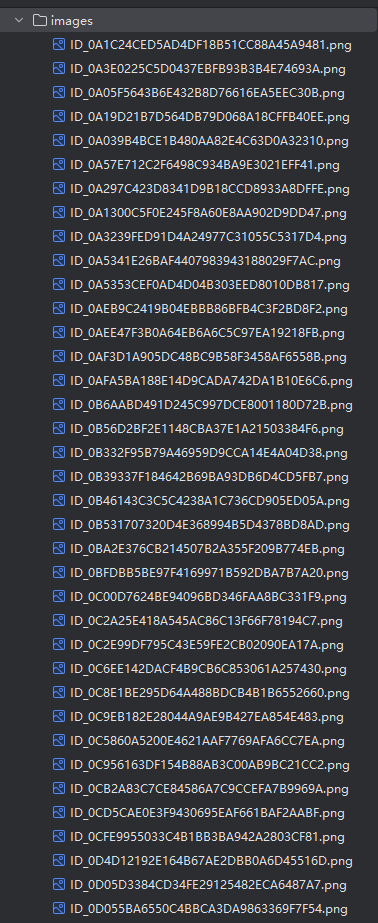
然后根据单元格公式值,自己映射一下即可,亲测有效
收藏7全部评论(1)
最新
发布评论
评论


