 收藏
收藏拼多多商家后台 数据加密字体,解密实现分享
 影刀高级开发者
字体文件会更新,请不要写死字体链接,实现动态提取网页中用于加密的字体文件链接,自己实现动态提取或者魔法指令
魔法指令代码
# 使用此指令前,请确保安装必要的Python库,例如使用以下命令安装:
# pip install beautifulsoup4
import re
from bs4 import BeautifulSoup
from typing import *
try:
from xbot.app.logging import trace as print
except:
from xbot import print
def extract_spider_font_urls(html_content):
"""
title: 提取spider字体URL链接
description: 从网页源代码中提取包含 % __spider_font % 相关的style标签内@font-face声明中的字体文件URL链接。
inputs:
- html_content (str): 网页源代码内容,eg: "<style>@font-face{font-family:'spider-font';src:url('https://example.com/font.ttf')}.__spider_font{font-family:'spider-font'}</style>"
outputs:
- font_urls (list): 提取到的字体文件URL列表,eg: ["https://example.com/font.ttf"]
"""
if not isinstance(html_content, str) or not html_content.strip():
raise ValueError("HTML内容不能为空")
def _extract_spider_font_urls(html_content: str) -> list:
"""
提取包含__spider_font的style标签中的字体URL
"""
soup = BeautifulSoup(html_content, 'html.parser')
font_urls = []
# 查找所有style标签
style_tags = soup.find_all('style')
for style_tag in style_tags:
style_content = style_tag.get_text()
# 检查是否包含__spider_font相关内容
if '__spider_font' in style_content:
# 使用正则表达式匹配@font-face中的url
font_face_pattern = r'@font-face\s*{[^}]*src:\s*url\([\'"]([^\'"]+)[\'"]\)[^}]*}'
matches = re.findall(font_face_pattern, style_content, re.IGNORECASE | re.DOTALL)
font_urls.extend(matches)
return font_urls
def _extract_with_regex_method(html_content: str) -> list:
"""
使用正则表达式直接匹配包含__spider_font的style标签
"""
# 匹配包含__spider_font的完整style标签
style_pattern = r'<style[^>]*>(.*?__spider_font.*?)</style>'
style_matches = re.findall(style_pattern, html_content, re.IGNORECASE | re.DOTALL)
font_urls = []
for style_content in style_matches:
# 从匹配的style内容中提取URL
url_pattern = r'@font-face[^}]*src:\s*url\([\'"]([^\'"]+)[\'"]\)[^}]*}'
url_matches = re.findall(url_pattern, style_content, re.IGNORECASE | re.DOTALL)
font_urls.extend(url_matches)
return font_urls
# 首先尝试使用BeautifulSoup解析
font_urls = _extract_spider_font_urls(html_content)
# 如果没有找到结果,使用正则表达式作为备用方案
if not font_urls:
font_urls = _extract_with_regex_method(html_content)
# 去重并过滤有效URL
unique_urls = []
for url in font_urls:
if url and url not in unique_urls and (url.startswith('http') or url.startswith('//')):
unique_urls.append(url)
if not unique_urls:
raise ValueError("未找到包含__spider_font的字体URL链接")
return unique_urls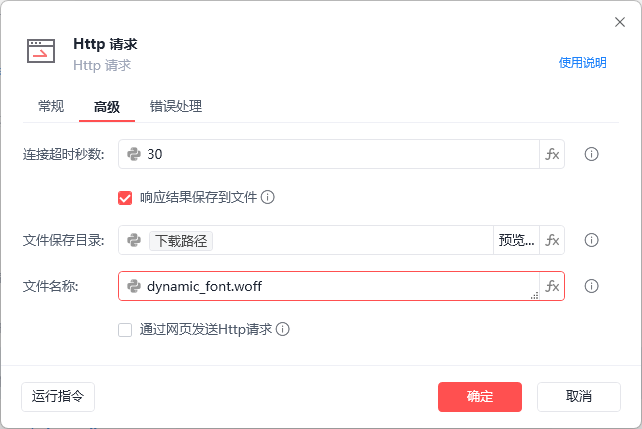
输出cmap字典格式如下:
{
58343: 9,
58878: 1,
58970: 2,
58975: 8,
59123: 0,
59667: 6,
60456: 7,
60574: 3,
60952: 5,
61082: 4
}
下方是实现加密字体文件的识别
from fontTools.ttLib import TTFont
from PIL import Image, ImageDraw, ImageFont
import ddddocr
import io
def render_glyph_to_image(font, glyph_name, size=120) -> io.BytesIO:
"""将字形渲染为PNG格式的字节流"""
img = Image.new('L', (size + 40, size + 40), 255) # 白色背景
draw = ImageDraw.Draw(img)
font_path = font.reader.file.name
try:
pil_font = ImageFont.truetype(font_path, size)
except Exception as e:
print(f"加载字体失败:{e}")
return None
# 找到字形对应的Unicode编码
cmap_reverse = {v: k for k, v in font.getBestCmap().items()}
unicode_code = cmap_reverse.get(glyph_name)
if not unicode_code:
return None
# 居中渲染文字(黑色)
draw.text((20, 20), chr(unicode_code), font=pil_font, fill=0)
# 保存为PNG字节流
img_byte_io = io.BytesIO()
img.save(img_byte_io, format='PNG')
img_byte_io.seek(0)
return img_byte_io
def get_unicode_to_number_map_ddddocr(target_font_path):
ocr = ddddocr.DdddOcr(show_ad=False)
font = TTFont(target_font_path)
cmap = font.getBestCmap()
result = {}
for unicode_code, glyph_name in cmap.items():
try:
img_byte_io = render_glyph_to_image(font, glyph_name)
if not img_byte_io:
continue
# 读取字节流并识别
img_bytes = img_byte_io.read()
res = ocr.classification(img_bytes).strip()
# 核心修复:将"o"或"O"强制转换为数字0
if res.upper() == "O": # 同时处理小写o和大写O
res = "0" # 替换为数字0
# 此时再判断是否为数字(0会被正确识别)
if res.isdigit():
result[unicode_code] = int(res)
else:
# 打印未识别的结果,方便排查其他问题
print(f"字形 {glyph_name} 识别为非数字:'{res}',已跳过")
except Exception as e:
print(f"识别字形 {glyph_name} 失败:{e}")
continue
return result
def main(target_font_path):
ocr_map = get_unicode_to_number_map_ddddocr(target_font_path)
# 验证0是否被正确识别
if 0 in ocr_map.values():
print(f"成功识别到数字0,对应Unicode编码:{[k for k, v in ocr_map.items() if v == 0]}")
else:
print("仍未识别到数字0,请检查字体或渲染参数")
return ocr_map
之后通过解密后的映射表还原 被加密的数据
原始的加密数据是 '\ueb33\ue4d5' 这种格式的
cmap是 Unicode十进制→数字的映射字典(如{60211:2, 62709:3})
举例处理的方式,原始文本text,自己根据自己的数据作相应的处理
processed_chars = []
for char in text:
char_unicode = ord(char) # 获取字符的Unicode十进制编码
# 查映射表:有对应数字则替换,无则保留原字符(.、%等)
processed_chars.append(str(ocr_map[char_unicode]) if char_unicode in ocr_map else char)
收藏4


