 收藏
收藏影刀RPA调用coze工作流
影刀RPA通过代码实现调用coze工作流
一、实现RPA流程
二、调用coze工作流实现原理
调用coze工作流是通过python代码实现的,python代码如下:
# 使用提醒:
# 1. xbot包提供软件自动化、数据表格、Excel、日志、AI等功能
# 2. package包提供访问当前应用数据的功能,如获取元素、访问全局变量、获取资源文件等功能
# 3. 当此模块作为流程独立运行时执行main函数
# 4. 可视化流程中可以通过"调用模块"的指令使用此模块

import xbot
from xbot import print, sleep
from .import package
from .package import variables as glv

import os  # noqa
import time
# Get an access_token through personal access token oroauth.
# 替换成你自己的token令牌
api_coze_token = "pat_*********gLkK"

from cozepy import Coze, TokenAuth, Message, ChatStatus, MessageContentType, ChatEventType  # noqa
from cozepy import COZE_CN_BASE_URL
# Init the Coze client through the access_token.
coze = Coze(auth=TokenAuth(token=api_coze_token), base_url=COZE_CN_BASE_URL)

# Create a bot instance in Coze, copy the last number from the web link as the bot's ID.
# 替换成你自己的智能体ID
bot_id = "753******5318"
# The user id identifies the identity of a user. Developers can use a custom business ID or a random string.
# userId随意填写
user_id = "yingdao"

def main(args):
    print("询问coze智能:",args)
    chat = coze.chat.create(
        bot_id=bot_id,
        user_id=user_id,
        additional_messages=[
            Message.build_user_question_text(args)
        ],
    )

    # Assume the development allows at most one chat to run for 10 minutes. If it exceeds 10
    # minutes, the chat will be cancelled.
    # And when the chat status is not completed, poll the status of the chat once every second.
    # After the chat is completed, retrieve all messages in the chat.
    start = int(time.time())
    # 超时时间600秒
    timeout = 600
    while chat.status == ChatStatus.IN_PROGRESS:
        if int(time.time()) - start > timeout:
            # too long, cancel chat
            coze.chat.cancel(conversation_id=chat.conversation_id, chat_id=chat.id)
            break

        time.sleep(1)
        # Fetch the latest data through the retrieve interface
        chat = coze.chat.retrieve(conversation_id=chat.conversation_id, chat_id=chat.id)

    # When the chat status becomes completed, all messages under this chat can be retrieved through the list messages interface.
    messages = coze.chat.messages.list(conversation_id=chat.conversation_id, chat_id=chat.id)

    for message in messages:
        # print(f"role={message.role}, content={message.content}")
        if(message.type == "answer") :
            answer = message.content
    return answer
代码里面需要写入自己智能体id和token令牌,userid也可以根据自己的需求修改,智能体id和token令牌如何获取我就不再赘述了
三、流程中调用上述代码
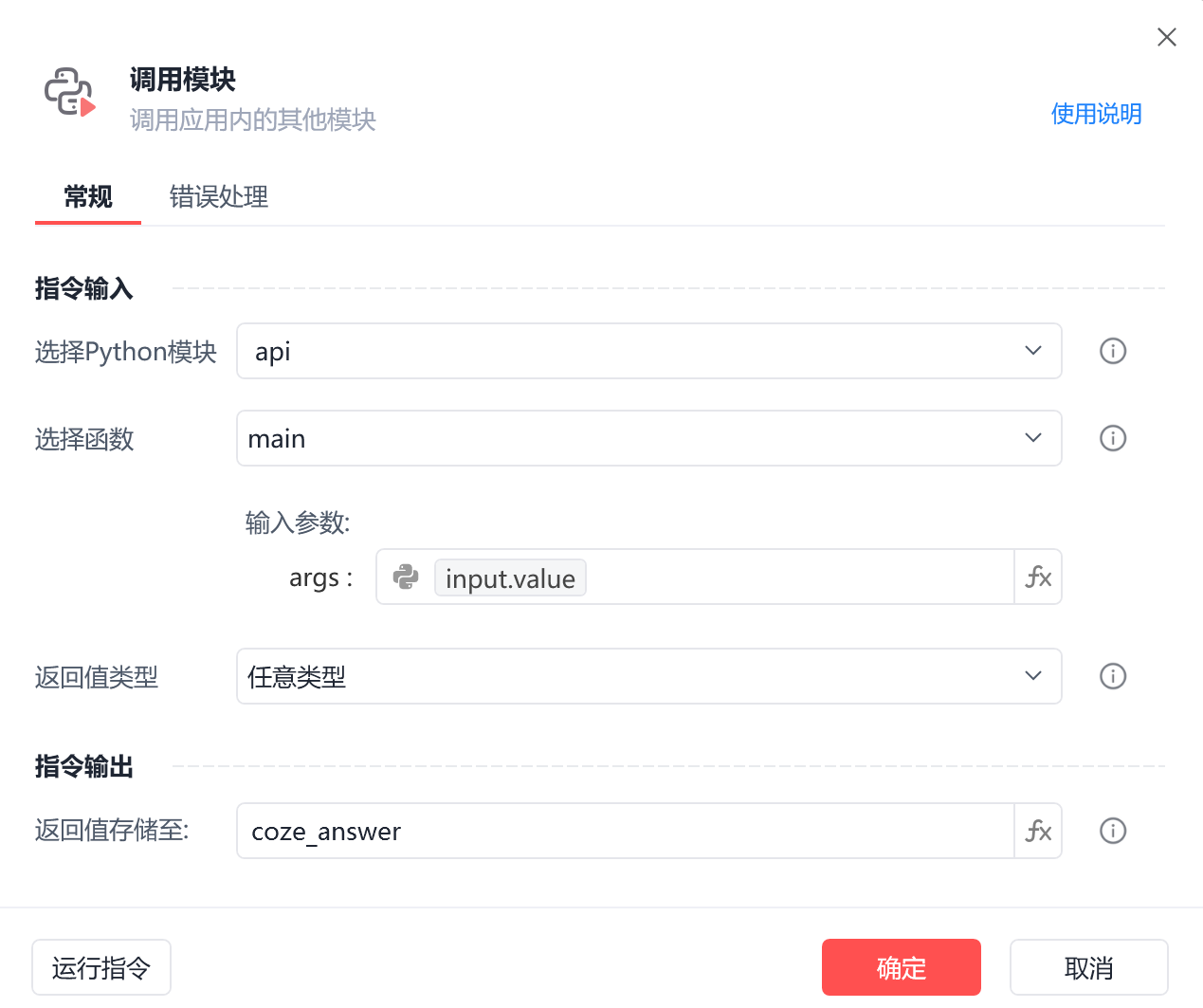
首先点击工作台右上角的红圈新建一个python文件,起一个名字,我这里起的名字是api,然后将步骤二中的代码粘贴进去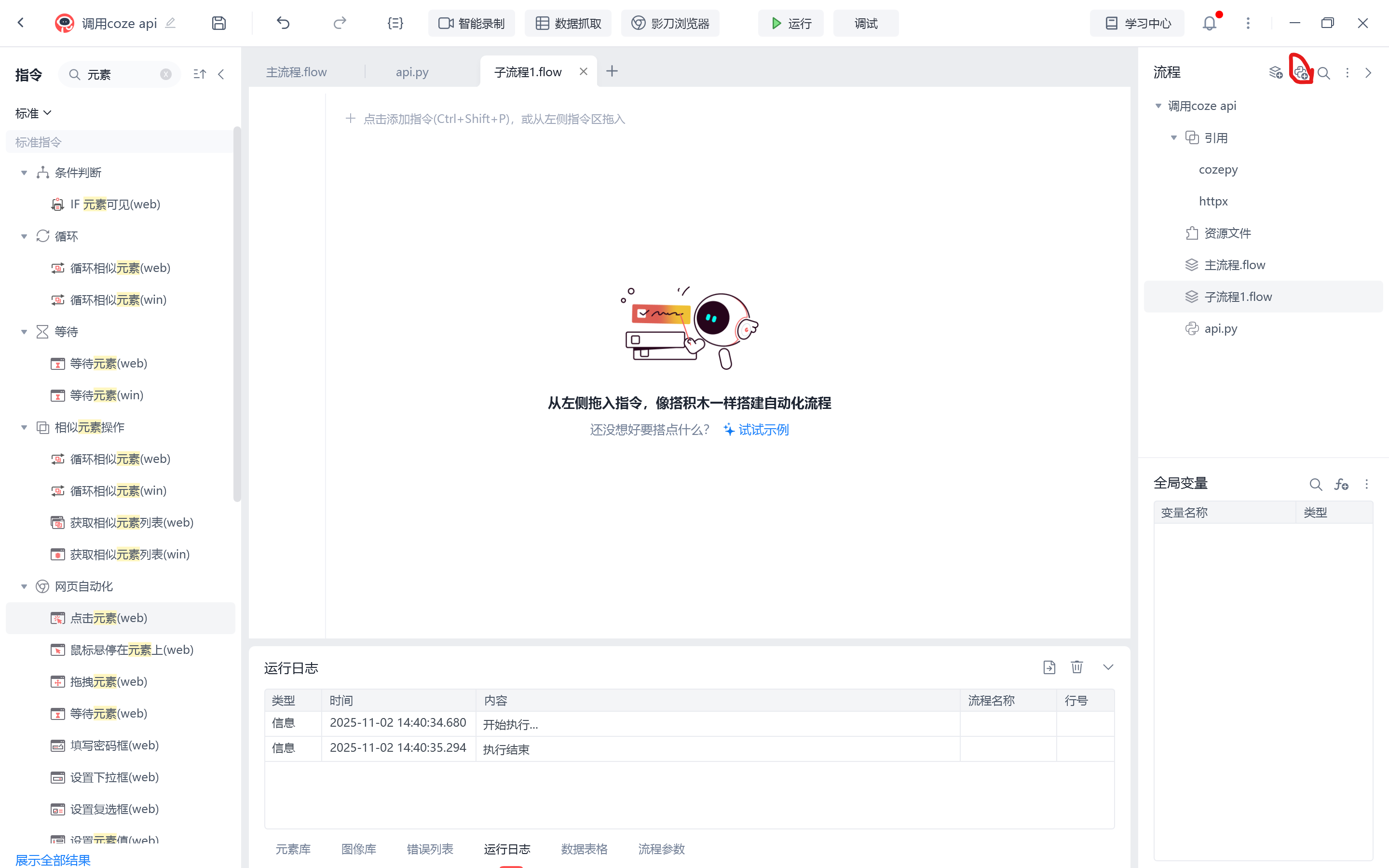 然后在流程搜索中搜索“调用模块”,将该模块加入到流程中,在选择python模块中选择刚刚的python代码,然后选择函数为main,输入参数、返回值类型和指令输出可以根据自己的需求调整
 四、写在最后
本文使用代码来自csdn大佬的博文,原文链接: https://blog.csdn.net/zf14840/article/details/150294326?fromshare=blogdetail&sharetype=blogdetail&sharerId=150294326&sharerefer=PC&sharesource=m0_74230979&sharefrom=from_link
另外就是这个代码的功能还有待完善,比如在调用模块界面传入智能体id、token令牌和userid,希望有大佬能给予完善并分享出来。
最后就是在小破站看到了一个视频,也是coze的api调用的视频,同样是使用上述方法完成的api调用,不过这位大佬的代码可以在调用模块界面以变量传入智能体id和token令牌。我在运行的时候出现了问题,coze智能体的输出结果不能以文本的形式输出,输出的是{"msg_type":"empty result","data":"empty result","from_module":null,"from_unit":null},不知道问题出现在哪里,希望有大佬能解答,并给出解决方法。他使用的代码如下:
# 使用提醒:
# 1. xbot包提供软件自动化、数据表格、Excel、日志、AI等功能
# 2. package包提供访问当前应用数据的功能,如获取元素、访问全局变量、获取资源文件等功能
# 3. 当此模块作为流程独立运行时执行main函数
# 4. 可视化流程中可以通过"调用模块"的指令使用此模块

import xbot
from xbot import print, sleep
from .import package
from .package import variables as glv

def main(args):
    pass

import os
import time
from cozepy import COZE_CN_BASE_URL
from cozepy import Coze, TokenAuth, Message, ChatStatus, MessageContentType  # noqa
coze_api_base = COZE_CN_BASE_URL

def ai(text, coze_api_token, bot_id):
    # coze_api_token = 'pat_t0nR9cjRROBwtexTj2Bd5VccUM3poHAqEBw7L2QpidD8xmv1RjrdVvMqgU010h2'
    coze = Coze(auth=TokenAuth(token=coze_api_token), base_url=coze_api_base)
    # bot_id = '7516019864251924531'
    user_id = '123456'
    chat_poll = coze.chat.create_and_poll(
        bot_id=bot_id,
        user_id=user_id,
        additional_messages=[
            Message.build_user_question_text(text),
            # Message.build_assistant_answer("我很自卑,请夸一下我"),
            # Message.build_user_question_text(text),
        ],
    )
    content = chat_poll.messages[0].content
    # for message in chat_poll.messages:
    #     content += message.content + '\n'
    return content
原视频链接:【影刀RPA调用AI 扣子API调用 影刀调用扣子 智能体】 https://www.bilibili.com/video/BV1R9M4zzE34/?share_source=copy_web&vd_source=d9f7d4841e5ece94140d2e92bdd5f5b7
收藏17


