好看的进度条!相当重要! 收藏
收藏
评论
收藏好看的进度条!相当重要!
再
2025-12-16 17:32·浏览量:446
再
再见史蒂夫周
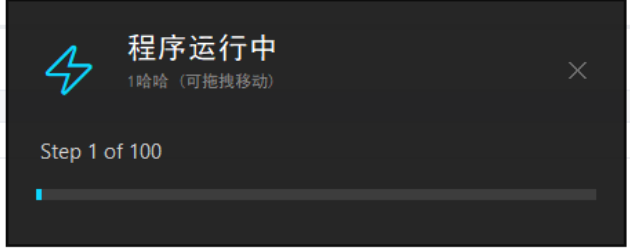
- 好看的进度条
- 功能1,显示进度
- 功能2,打印日志
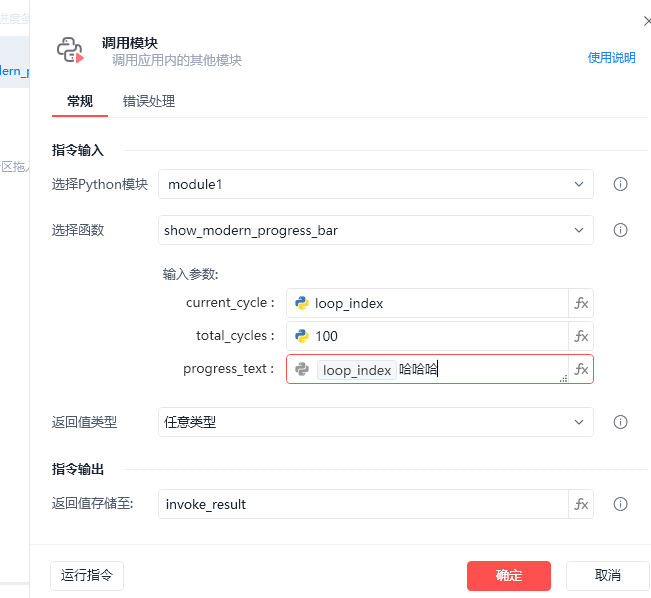
输入1为循环项
输入2为循环总数
输入3为日志内容(可为空)
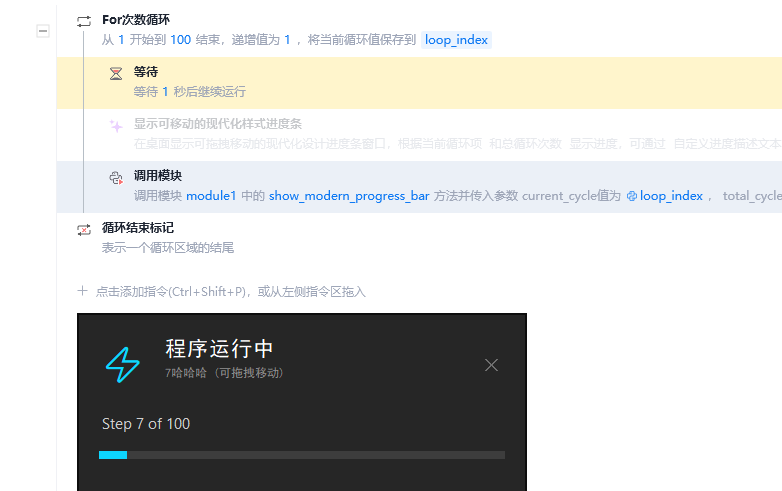
 代码如下
代码如下
import tkinter as tk
import threading
import time

from typing import *
try:
    from xbot.app.logging import trace as print
except:
    from xbot import print


def show_modern_progress_bar(current_cycle, total_cycles, progress_text=""):
    """
    title: 显示可移动的现代化样式进度条
    description: 在桌面显示可拖拽移动的现代化设计进度条窗口,根据当前循环项 % current_cycle % 和总循环次数 % total_cycles % 显示进度,可通过 % progress_text % 自定义进度描述文本。
    inputs:
        - current_cycle (int): 当前循环项,eg: "35"
        - total_cycles (int): 总循环次数,eg: "100"
        - progress_text (str): 自定义进度描述文本,eg: "数据处理进度.."
    outputs:
        None
    """

    if not isinstance(total_cycles, int) or total_cycles <= 0:
        raise ValueError("总循环次数必须为正整数")

    if not isinstance(current_cycle, int) or current_cycle < 0:
        raise ValueError("当前循环项必须为非负整数")

    if current_cycle > total_cycles:
        raise ValueError("当前循环项不能超过总循环次数")

    # 设置默认进度描述文本
    if not progress_text or progress_text.strip() == "":
        progress_text = "程序运行进度.."

    if not hasattr(show_modern_progress_bar, 'root') or show_modern_progress_bar.root is None:

        def _create_modern_window():
            """创建现代化样式的进度条窗口"""
            root = tk.Tk()
            root.title("")
            root.attributes('-topmost', True)
            root.overrideredirect(True)  # 无边框

            # 窗口尺寸和位置
            window_width = 450
            window_height = 180
            screen_width = root.winfo_screenwidth()
            screen_height = root.winfo_screenheight()
            x = (screen_width - window_width) // 2
            y = screen_height - window_height - 120
            root.geometry(f"{window_width}x{window_height}+{x}+{y}")

            # 设置透明背景
            root.configure(bg='black')
            root.attributes('-alpha', 0.95)

            # 拖拽功能变量
            root.drag_data = {"x": 0, "y": 0}

            def _start_drag(event):
                """开始拖拽"""
                root.drag_data["x"] = event.x
                root.drag_data["y"] = event.y

            def _stop_drag(event):
                """停止拖拽"""
                root.drag_data["x"] = 0
                root.drag_data["y"] = 0

            def _do_drag(event):
                """执行拖拽"""
                dx = event.x - root.drag_data["x"]
                dy = event.y - root.drag_data["y"]
                x = root.winfo_x() + dx
                y = root.winfo_y() + dy
                root.geometry(f"+{x}+{y}")

            # 创建主容器
            main_container = tk.Frame(root, bg='#1a1a1a', relief='flat')
            main_container.pack(fill='both', expand=True, padx=2, pady=2)

            # 绑定拖拽事件到主容器
            main_container.bind("<Button-1>", _start_drag)
            main_container.bind("<ButtonRelease-1>", _stop_drag)
            main_container.bind("<B1-Motion>", _do_drag)

            # 顶部区域 - 图标和标题
            header_frame = tk.Frame(main_container, bg='#1a1a1a', height=60)
            header_frame.pack(fill='x', padx=20, pady=(20, 10))
            header_frame.pack_propagate(False)

            # 绑定拖拽事件到header_frame
            header_frame.bind("<Button-1>", _start_drag)
            header_frame.bind("<ButtonRelease-1>", _stop_drag)
            header_frame.bind("<B1-Motion>", _do_drag)

            # 使用文本图标
            icon_label = tk.Label(header_frame, text="⚡", font=("Arial", 24),
                                bg='#1a1a1a', fg='#00d4ff')
            icon_label.pack(side='left')

            # 绑定拖拽事件到icon_label
            icon_label.bind("<Button-1>", _start_drag)
            icon_label.bind("<ButtonRelease-1>", _stop_drag)
            icon_label.bind("<B1-Motion>", _do_drag)

            # 标题文本
            title_frame = tk.Frame(header_frame, bg='#1a1a1a')
            title_frame.pack(side='left', fill='both', expand=True, padx=(15, 0))

            # 绑定拖拽事件到title_frame
            title_frame.bind("<Button-1>", _start_drag)
            title_frame.bind("<ButtonRelease-1>", _stop_drag)
            title_frame.bind("<B1-Motion>", _do_drag)

            title_label = tk.Label(title_frame, text="程序运行中",
                                 font=("SimHei", 16, "normal"),
                                 bg='#1a1a1a', fg='#ffffff', anchor='w')
            title_label.pack(anchor='w')

            # 绑定拖拽事件到title_label
            title_label.bind("<Button-1>", _start_drag)
            title_label.bind("<ButtonRelease-1>", _stop_drag)
            title_label.bind("<B1-Motion>", _do_drag)

            subtitle_label = tk.Label(title_frame, text=f"{progress_text} (可拖拽移动)",
                                    font=("SimHei", 9),
                                    bg='#1a1a1a', fg='#888888', anchor='w')
            subtitle_label.pack(anchor='w', pady=(2, 0))

            # 绑定拖拽事件到subtitle_label
            subtitle_label.bind("<Button-1>", _start_drag)
            subtitle_label.bind("<ButtonRelease-1>", _stop_drag)
            subtitle_label.bind("<B1-Motion>", _do_drag)

            # 关闭按钮
            close_btn = tk.Label(header_frame, text="✕", font=("Arial", 14),
                               bg='#1a1a1a', fg='#666666', cursor='hand2')
            close_btn.pack(side='right')
            close_btn.bind("<Button-1>", lambda e: _close_window())
            close_btn.bind("<Enter>", lambda e: close_btn.config(fg='#ff4757'))
            close_btn.bind("<Leave>", lambda e: close_btn.config(fg='#666666'))

            # 进度信息区域
            info_frame = tk.Frame(main_container, bg='#1a1a1a')
            info_frame.pack(fill='x', padx=20, pady=(5, 15))

            # 绑定拖拽事件到info_frame
            info_frame.bind("<Button-1>", _start_drag)
            info_frame.bind("<ButtonRelease-1>", _stop_drag)
            info_frame.bind("<B1-Motion>", _do_drag)

            info_label = tk.Label(info_frame, text="", font=("Segoe UI", 11),
                                bg='#1a1a1a', fg='#cccccc')
            info_label.pack(anchor='w')

            # 绑定拖拽事件到info_label
            info_label.bind("<Button-1>", _start_drag)
            info_label.bind("<ButtonRelease-1>", _stop_drag)
            info_label.bind("<B1-Motion>", _do_drag)

            # 自定义进度条区域
            progress_container = tk.Frame(main_container, bg='#1a1a1a')
            progress_container.pack(fill='x', padx=20, pady=(0, 10))

            # 进度条背景
            progress_bg = tk.Frame(progress_container, bg='#333333', height=8)
            progress_bg.pack(fill='x')

            # 进度条前景
            progress_fg = tk.Frame(progress_bg, bg='#00d4ff', height=8)
            progress_fg.place(x=0, y=0)

            # 百分比显示
            percentage_frame = tk.Frame(main_container, bg='#1a1a1a')
            percentage_frame.pack(fill='x', padx=20, pady=(10, 20))

            # 绑定拖拽事件到percentage_frame
            percentage_frame.bind("<Button-1>", _start_drag)
            percentage_frame.bind("<ButtonRelease-1>", _stop_drag)
            percentage_frame.bind("<B1-Motion>", _do_drag)

            percent_label = tk.Label(percentage_frame, text="", font=("Segoe UI", 12, "bold"),
                                   bg='#1a1a1a', fg='#00d4ff')
            percent_label.pack(side='right')

            # 绑定拖拽事件到percent_label
            percent_label.bind("<Button-1>", _start_drag)
            percent_label.bind("<ButtonRelease-1>", _stop_drag)
            percent_label.bind("<B1-Motion>", _do_drag)

            # 状态标签
            status_label = tk.Label(percentage_frame, text="", font=("Segoe UI", 10),
                                  bg='#1a1a1a', fg='#888888')
            status_label.pack(side='left')

            # 绑定拖拽事件到status_label
            status_label.bind("<Button-1>", _start_drag)
            status_label.bind("<ButtonRelease-1>", _stop_drag)
            status_label.bind("<B1-Motion>", _do_drag)

            # 保存组件引用
            show_modern_progress_bar.root = root
            show_modern_progress_bar.info_label = info_label
            show_modern_progress_bar.progress_fg = progress_fg
            show_modern_progress_bar.progress_container = progress_container
            show_modern_progress_bar.percent_label = percent_label
            show_modern_progress_bar.status_label = status_label
            show_modern_progress_bar.subtitle_label = subtitle_label

            def _close_window():
                show_modern_progress_bar.root = None
                root.destroy()

            return root

        def _start_window():
            """在后台线程启动窗口"""
            window = _create_modern_window()
            window.mainloop()

        # 启动窗口线程
        if not hasattr(show_modern_progress_bar, 'thread_started'):
            thread = threading.Thread(target=_start_window, daemon=True)
            thread.start()
            show_modern_progress_bar.thread_started = True
            time.sleep(0.8)
    else:
        # 更新已存在窗口的进度描述文本
        if hasattr(show_modern_progress_bar, 'subtitle_label'):
            try:
                show_modern_progress_bar.subtitle_label.config(text=f"{progress_text} (可拖拽移动)")
            except Exception:
                pass

    # 更新进度显示
    def _update_progress():
        """更新现代化进度显示"""
        if hasattr(show_modern_progress_bar, 'root') and show_modern_progress_bar.root:
            try:
                # 计算百分比
                percentage = (current_cycle / total_cycles) * 100

                # 更新进度信息
                show_modern_progress_bar.info_label.config(
                    text=f"Step {current_cycle} of {total_cycles}")

                # 更新进度条宽度
                container_width = show_modern_progress_bar.progress_container.winfo_width()
                if container_width > 1:  # 确保容器已渲染
                    progress_width = int((container_width * percentage) / 100)
                    show_modern_progress_bar.progress_fg.config(width=progress_width)

                # 更新百分比
                show_modern_progress_bar.percent_label.config(text=f"{percentage:.0f}%")

                # 更新状态
                if percentage < 100:
                    show_modern_progress_bar.status_label.config(text="In Progress")
                    show_modern_progress_bar.progress_fg.config(bg='#00d4ff')
                else:
                    show_modern_progress_bar.status_label.config(text="✓ Completed", fg='#2ed573')
                    show_modern_progress_bar.progress_fg.config(bg='#2ed573')

                # 刷新界面
                show_modern_progress_bar.root.update()

            except Exception:
                pass

_update_progress()全部评论(1)
最新
发布评论
评论


