采用豆包API,识别六宫格、九宫格验证码 收藏
收藏
评论
收藏采用豆包API,识别六宫格、九宫格验证码
肆
2025-12-18 11:04·浏览量:1585
肆
肆月-YD
 影刀中级开发者
当前市场识别验证码技术主要依赖于目标检测、模板匹配、相似度计算等等。。。这类技术在根本上还是存在着一定的局限性。例如:
- 一旦验证码设计方更新样式(比如新增随机干扰、动态变形、语义型谜题),识别模型需要重新标注数据、微调迭代,这个过程会有 1-7 天的响应空档期,空档期内识别准确率会暴跌。
- 数据标注、模型迭代的成本,随着验证码的复杂度提升,这部分成本会线性增长
随着多模态大模型的发展,AI为验证码识别带来了从技术逻辑到应用形态的根本性变革,打破了传统单模态识别的局限。
本贴将使用Doubao-Seed-1.6|251015 版本进行验证码识别的测试,本次测试采用了极验九宫格(锅)以及阿里九宫格(地球仪)的验证码进行识别测试

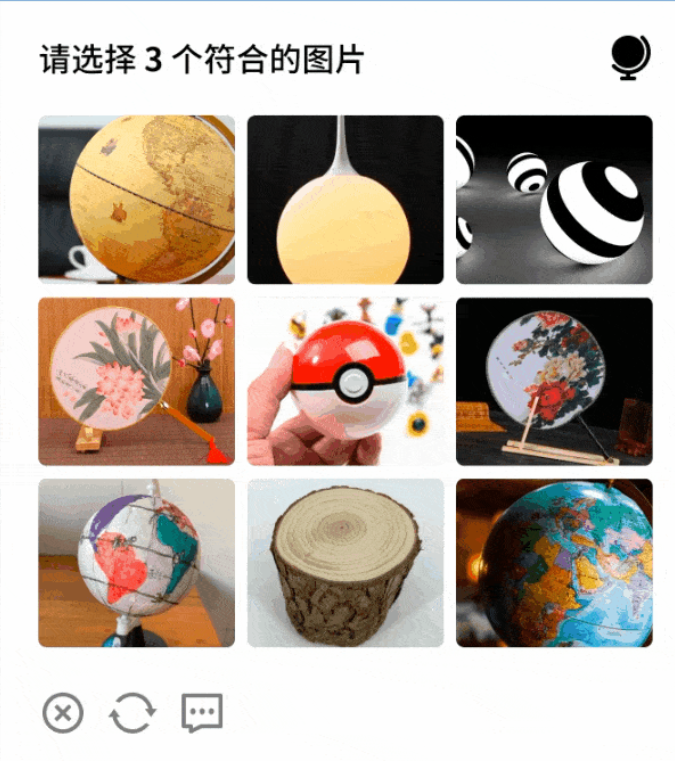
测试结果如下:


经测试阿里九宫格以及极验九宫格都有着不错的识别率(大概90%正确率)以及速度,相较于价格上来说单次请求不超过100token,也就是单次识别价格0.0001-0.0002元
其他验证码可自行测试,在代码中question进行修改提问
ps:九宫格验证码的设计目的,更多是拦截简单的脚本爬虫,而不是专门针对 AI 识别做对抗设计,很多厂商在设计时不会加入对抗样本、动态干扰这类反 AI 的元素,进一步降低了 AI 的识别难度。因此AI对这类验证码的识别率相对较高。
doubao_api_key来源:火山方舟管理控制台新用户赠送50w额度
doubao_endpoint_id:火山方舟管理控制台开通在线推理常规在线推理(按Token付费)--火山方舟大模型服务平台-火山引擎
image_paths:验证码图片路径
影刀示例:
以下附上代码:
# 使用提醒:
# 1. xbot包提供软件自动化、数据表格、Excel、日志、AI等功能
# 2. package包提供访问当前应用数据的功能,如获取元素、访问全局变量、获取资源文件等功能
# 3. 当此模块作为流程独立运行时执行main函数
# 4. 可视化流程中可以通过"调用模块"的指令使用此模块

import requests
import base64
import json
import os
import time
from concurrent.futures import ThreadPoolExecutor, as_completed
import argparse

# 豆包AI API配置
DOUBAO_API_URL = "https://ark.cn-beijing.volces.com/api/v3/chat/completions"

def main(doubao_api_key, doubao_endpoint_id, image_paths=None):
    """
    主函数,使用多线程调用豆包AI处理图片

    参数:
    doubao_api_key: 豆包AI API密钥
    doubao_endpoint_id: 豆包AI接入点ID
    image_paths: 图片路径列表,默认为None,会使用默认的9张图片
    """
    # 设置全局变量
    global DOUBAO_API_KEY, DOUBAO_ENDPOINT_ID
    DOUBAO_API_KEY = doubao_api_key
    DOUBAO_ENDPOINT_ID = doubao_endpoint_id

    # 验证API密钥和接入点ID是否为空
    if not doubao_api_key or not doubao_endpoint_id:
        raise ValueError("API密钥和接入点ID不能为空")

    # 记录总开始时间
    total_start_time = time.time()

    # 定义问题文本
    question = "这是一个多选题,上边是题目,下边是描述,请回答正确选项的位置,例如:第一行第一个,不要回答其他的"

    # 如果没有提供图片路径,则提示用户必须提供图片路径
    if image_paths is None:
        print("错误:请提供图片路径参数")
        return []
    else:
        print(f"接收到的图片路径列表: {image_paths}")
        # 处理可能被错误分割的路径
        if len(image_paths) > 1 and all(len(path) == 1 for path in image_paths[:3]):
            # 如果前几个参数都是单个字符,可能是路径被分割了,尝试重新组合
            combined_path = "".join(image_paths)
            if os.path.exists(combined_path):
                print(f"检测到可能被错误分割的路径,重新组合为: {combined_path}")
                image_paths = [combined_path]
            else:
                # 尝试其他组合方式
                potential_path = image_paths[0] + ":" + "\\".join(image_paths[1:])
                if os.path.exists(potential_path):
                    print(f"检测到可能被错误分割的路径,重新组合为: {potential_path}")
                    image_paths = [potential_path]
                else:
                    print("无法重新组合路径,请检查命令行参数格式")
    # 先在main函数中检查并编码所有图片
    encoded_images = {}
    valid_image_paths = []
    for img_path in image_paths:
        print(f"处理图片路径: {img_path}")
        if not os.path.exists(img_path):
            print(f"警告:图片文件不存在: {img_path}")
        else:
            try:
                # 在main函数中直接调用encode_image_to_base64
                base64_image = encode_image_to_base64(img_path)
                encoded_images[img_path] = base64_image
                valid_image_paths.append(img_path)
                print(f"图片 {os.path.basename(img_path)} 编码成功")
            except Exception as e:
                print(f"图片 {os.path.basename(img_path)} 编码失败: {str(e)}")

    if not valid_image_paths:
        print("没有有效的图片文件可以处理")
        return []

    try:
        print(f"正在使用多线程调用豆包AI识别{len(valid_image_paths)}张图片...")

        # 创建线程池,最多9个线程
        with ThreadPoolExecutor(max_workers=min(9, len(valid_image_paths))) as executor:
            # 提交任务,每个任务处理一张图片,传递已编码的图片数据
            future_to_img = {executor.submit(call_doubao_ai_with_encoded_image, img_path, encoded_images[img_path], question): img_path for img_path in valid_image_paths}

            # 收集结果
            results = []
            for future in as_completed(future_to_img):
                img_path = future_to_img[future]
                try:
                    answer = future.result()
                    results.append((img_path, answer))
                    print(f"图片 {img_path} 的回答:")
                    print(answer)
                except Exception as e:
                    print(f"图片 {img_path} 处理失败: {str(e)}")

        # 记录总结束时间
        total_end_time = time.time()
        # 计算总耗时
        total_elapsed_time = total_end_time - total_start_time
        print(f"总处理耗时: {total_elapsed_time:.2f} 秒")

        return results
    except Exception as e:
         print(f"错误: {str(e)}")
         return []
def encode_image_to_base64(image_path):
    """
    将图片文件编码为base64字符串
    """
    with open(image_path, "rb") as image_file:
        return base64.b64encode(image_file.read()).decode('utf-8')

def call_doubao_ai_with_encoded_image(image_path, base64_image, question):
    """
    调用豆包AI API,提交已编码的图片和问题,返回答案

    参数:
    image_path: 图片文件路径
    base64_image: 已编码的图片base64字符串
    question: 提问的问题

    返回:
    AI的回答文本
    """
    # 记录开始时间
    start_time = time.time()

    try:
        # 构建请求头
        headers = {
            "Authorization": f"Bearer {DOUBAO_API_KEY}",
            "Content-Type": "application/json"
        }

        # 构建请求体
        payload = {
            "model": DOUBAO_ENDPOINT_ID,  # 使用配置的接入点ID
            "messages": [
                {
                    "role": "user",
                    "content": [
                        {
                            "type": "text",
                            "text": question
                        },
                        {
                            "type": "image_url",
                            "image_url": {
                                "url": f"data:image/png;base64,{base64_image}"
                            }
                        }
                    ]
                }
            ],
            "max_tokens": 2048
        }

        # 发送POST请求到豆包AI API
        response = requests.post(DOUBAO_API_URL, headers=headers, json=payload)

        # 检查响应状态
        if response.status_code == 200:
            result = response.json()
            # 提取AI的回答
            answer = result['choices'][0]['message']['content']

            # 记录结束时间
            end_time = time.time()
            # 计算耗时
            elapsed_time = end_time - start_time
            print(f"图片 {image_path} 处理耗时: {elapsed_time:.2f} 秒")

            return answer
        else:
            raise Exception(f"API请求失败,状态码: {response.status_code}, 错误信息: {response.text}")

    except requests.exceptions.RequestException as e:
        end_time = time.time()
        elapsed_time = end_time - start_time
        print(f"图片 {image_path} 处理耗时: {elapsed_time:.2f} 秒,但发生网络请求错误")
        raise Exception(f"网络请求错误: {str(e)}")
    except KeyError as e:
        end_time = time.time()
        elapsed_time = end_time - start_time
        print(f"图片 {image_path} 处理耗时: {elapsed_time:.2f} 秒,但发生API响应格式错误")
        raise Exception(f"API响应格式错误,缺少字段: {str(e)}")
    except Exception as e:
        end_time = time.time()
        elapsed_time = end_time - start_time
        print(f"图片 {image_path} 处理耗时: {elapsed_time:.2f} 秒,但发生错误")
        raise Exception(f"调用豆包AI时发生错误: {str(e)}")


def parse_args():
    """解析命令行参数"""
    parser = argparse.ArgumentParser(description="豆包AI图片识别工具")
    parser.add_argument("--api_key", required=True, help="豆包AI API密钥")
    parser.add_argument("--endpoint_id", required=True, help="豆包AI接入点ID")
    parser.add_argument("--image_paths", nargs="+", help="图片路径列表")
    return parser.parse_args()

if __name__ == "__main__":
    args = parse_args()
    print(f"接收到的图片路径参数: {args.image_paths}")
    main(args.api_key, args.endpoint_id, args.image_paths)
全部评论(1)
最新
发布评论
评论


