 收藏
收藏如何通过钉钉API上传本地图片&钉钉机器人发送图片到群聊--免图床版

 影刀专家
影刀专家前提条件
- 一个具有上传图片权限的钉钉应用
- 钉钉应用的AppKey和AppSecret
- 钉钉企业机器人的Webhook URL和密钥(Secret)
步骤一:获取访问令牌
要使用钉钉API,首先需要获取访问令牌(Access Token)。访问令牌是后续所有API调用的基础,用于身份验证。
def get_temporary_material_access_token(appkey, appsecret): get_access_token_url = "https://oapi.dingtalk.com/gettoken" params = { 'appkey': appkey, 'appsecret': appsecret } response = requests.get(get_access_token_url, params=params) if response.status_code == 200: data = response.json() if 'access_token' in data: return data['access_token'] else: print("获取临时素材access_token失败,响应数据格式错误") return None else: print(f"获取临时素材access_token失败,状态码:{response.status_code}") return None步骤二:生成加签
为了保障通信的安全性,钉钉要求发送到群聊的消息必须携带签名(Sign)。签名是根据当前时间戳和机器人的密钥生成的。
def generate_sign(secret, timestamp): """生成加签""" string_to_sign = f'{timestamp}\n{secret}' hmac_code = hmac.new(secret.encode("utf-8"), string_to_sign.encode("utf-8"), digestmod=hashlib.sha256).digest() sign = base64.b64encode(hmac_code).decode("utf-8") return sign步骤三:上传图片
获取到访问令牌后,我们可以使用它来上传图片。上传图片的API需要传递访问令牌和图片类型(本例中为image)。
try: # 使用获取到的upload_access_token替换为实际的上传临时素材链接 upload_media_url = f'https://oapi.dingtalk.com/media/upload?access_token={upload_access_token}&type=image' with open(image_path, 'rb') as f: files = {'media': ('image.jpg', f.read())} upload_response = requests.post(upload_media_url, files=files) if upload_response.status_code == 200: media_response = json.loads(upload_response.text) if 'media_id' in media_response: media_id = media_response['media_id'] else: print("上传图片失败,响应数据格式错误") else: print(f"上传图片失败,状态码:{upload_response.status_code}") except FileNotFoundError: print(f"无法找到指定的图片文件:{image_path}") except Exception as e: print(f"发送过程中出现错误:{str(e)}")步骤四:发送消息
最后一步是构造加签请求头,并发送消息到钉钉群聊中。消息将以Markdown格式发送,其中包含刚刚上传的图片链接。
headers = { 'Content-Type': 'application/json', 'X-Authorization': f'Signature timestamp={timestamp}, sign={sign}' } payload = { "msgtype": "markdown", "markdown": { "title": "图片", "text": f"[图片]({media_id})" }, } send_response = requests.post(webhook_url, headers=headers, data=json.dumps(payload)) if send_response.status_code == 200: print("图片已成功发送至钉钉群聊") else: print(f"发送失败,错误信息:{send_response.text}")完整代码示例
以下是完整的Python代码示例,展示了如何将图片上传到钉钉并发送到群聊中。
import requests
import json
import base64
import time
import hmac
import hashlib
def get_temporary_material_access_token(appkey, appsecret):
get_access_token_url = "https://oapi.dingtalk.com/gettoken"
params = {
'appkey': appkey,
'appsecret': appsecret
}
response = requests.get(get_access_token_url, params=params)
if response.status_code == 200:
data = response.json()
if 'access_token' in data:
return data['access_token']
else:
print("获取临时素材access_token失败,响应数据格式错误")
return None
else:
print(f"获取临时素材access_token失败,状态码:{response.status_code}")
return None
def generate_sign(secret, timestamp):
"""生成加签"""
string_to_sign = f'{timestamp}\n{secret}'
hmac_code = hmac.new(secret.encode("utf-8"), string_to_sign.encode("utf-8"), digestmod=hashlib.sha256).digest()
sign = base64.b64encode(hmac_code).decode("utf-8")
return sign
def main(args=None):
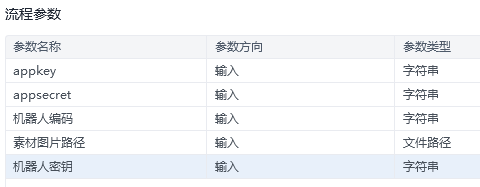
if args is None or 'appkey' not in args or 'appsecret' not in args or '机器人编码' not in args or '素材图片路径' not in args or '机器人密钥' not in args:
print("缺少必要的参数,请确保提供了 appkey, appsecret, 机器人编码, 素材图片路径, 机器人密钥")
return
appkey = args["appkey"]
appsecret = args["appsecret"]
webhook_url = args["机器人编码"]
image_path = args["素材图片路径"]
secret = args["机器人密钥"]
# 获取上传临时素材所需的access_token
upload_access_token = get_temporary_material_access_token(appkey, appsecret)
if upload_access_token is None:
print("获取access_token失败,无法继续执行")
return
timestamp = str(round(time.time() * 1000))
sign = generate_sign(secret, timestamp)
try:
# 使用获取到的upload_access_token替换为实际的上传临时素材链接
upload_media_url = f'https://oapi.dingtalk.com/media/upload?access_token={upload_access_token}&type=image'
with open(image_path, 'rb') as f:
files = {'media': ('image.jpg', f.read())}
upload_response = requests.post(upload_media_url, files=files)
if upload_response.status_code == 200:
media_response = json.loads(upload_response.text)
if 'media_id' in media_response:
media_id = media_response['media_id']
# 构造加签请求头
headers = {
'Content-Type': 'application/json',
'X-Authorization': f'Signature timestamp={timestamp}, sign={sign}'
}
payload = {
"msgtype": "markdown",
"markdown": {
"title": "图片",
"text": f""
},
}
send_response = requests.post(webhook_url, headers=headers, data=json.dumps(payload))
if send_response.status_code == 200:
print("图片已成功发送至钉钉群聊")
else:
print(f"发送失败,错误信息:{send_response.text}")
else:
print("上传图片失败,响应数据格式错误")
else:
print(f"上传图片失败,状态码:{upload_response.status_code}")
except FileNotFoundError:
print(f"无法找到指定的图片文件:{image_path}")
except Exception as e:
print(f"发送过程中出现错误:{str(e)}")
if __name__ == "__main__":
args = {
"appkey": "your_appkey",
"appsecret": "your_appsecret",
"机器人编码": "your_webhook_url",
"素材图片路径": "path_to_your_image",
"机器人密钥": "your_robot_secret"
}
main(args)
直接封装即可使用
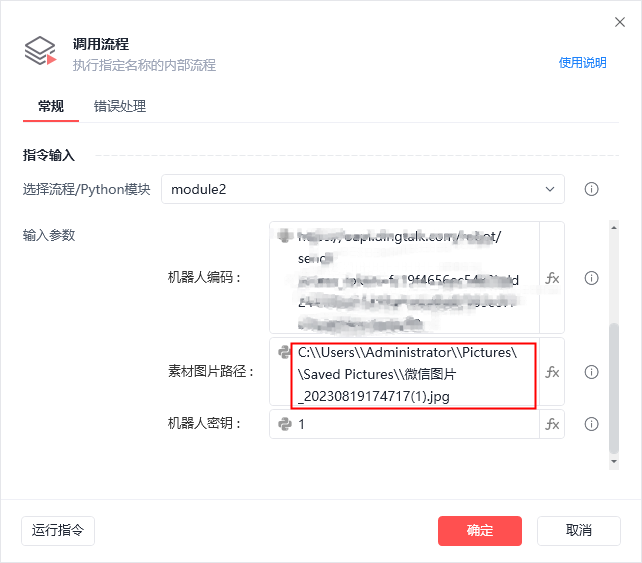
图片路径请使用双反斜杠 \\
收藏12


