Excel数据批量写入钉钉AI表格 收藏
收藏
评论
收藏Excel数据批量写入钉钉AI表格
粒
2026-03-31 09:30·浏览量:295
粒
粒粒
 发布于 2026-03-31 09:21更新于 2026-03-31 09:30295浏览
更多钉钉AI表格指南请看这篇文档👉👉👉钉钉AI表格操作指南
一、背景与需求
在日常业务过程中,许多场景都需要将 Excel 表格中的数据批量导入到钉钉 AI 表格 中。例如:
业务数据汇总
运营数据记录
批量信息录入
在数据量较小的情况下,通常可以通过钉钉扩展的指令【新增多行记录】或者魔法指令进行写入。但当数据量较大时,这种方式会带来效率低、容易出错、难以复用。
因此,需要一种 高效、稳定、可自动化执行的数据导入方式,以实现 Excel 数据向钉钉 AI 表格的批量写入。
二、解决思路
本文参考了小迪老师的的一篇技术文章。文章中通过 Python 脚本对 Excel 数据进行格式转换和处理,从而实现Excel数据写入飞书多维表的处理流程。这一思路具有很强的可扩展性,也非常适合用于钉钉AI表格写入的场景。
三、整体流程
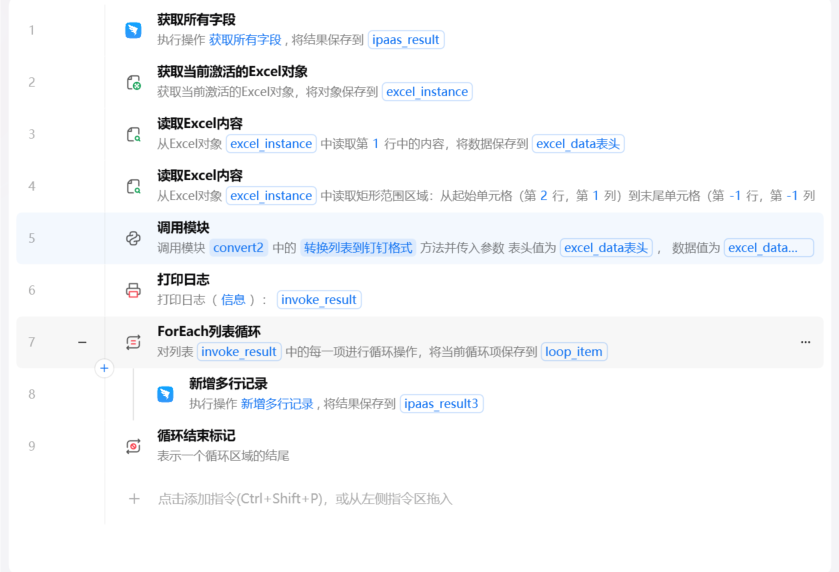
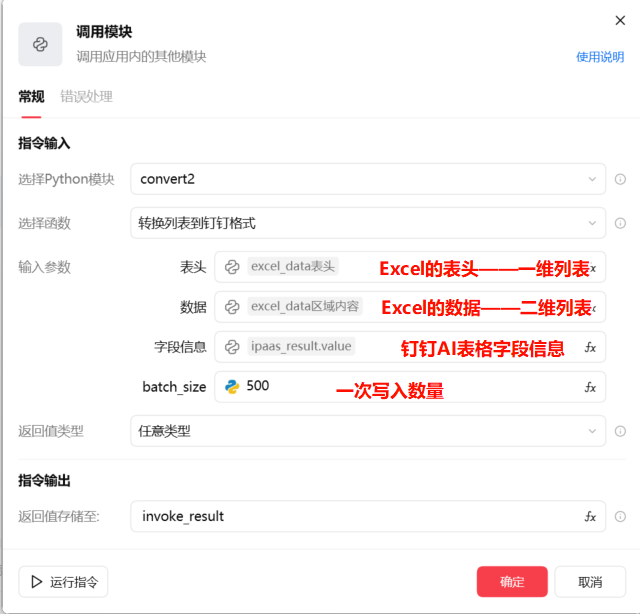
第5行调用模块——Python代码
import datetime

def _parse_dt_to_ms(v):
    if v in ("", None):
        return None
    if isinstance(v, datetime.datetime):
        return int(v.timestamp() * 1000)
    if isinstance(v, datetime.date):
        dt = datetime.datetime.combine(v, datetime.time.min)
        return int(dt.timestamp() * 1000)
    if isinstance(v, (int, float)):
        x = int(v)
        if x > 10_000_000_000:  # ms
            return x
        if x > 1_000_000_000:   # s
            return x * 1000
        return x
    s = str(v).strip()
    for fmt in ("%Y/%m/%d", "%Y-%m-%d", "%Y/%m/%d %H:%M:%S", "%Y-%m-%d %H:%M:%S", "%Y/%m/%d %H:%M", "%Y-%m-%d %H:%M"):
        try:
            dt = datetime.datetime.strptime(s, fmt)
            return int(dt.timestamp() * 1000)
        except ValueError:
            pass
    return s

def _split_list(v):
    if v in ("", None):
        return []
    if isinstance(v, list):
        return [str(x).strip() for x in v if str(x).strip()]
    s = str(v).replace(",", ",")
    return [x.strip() for x in s.split(",") if x.strip()]

def 转换列表到钉钉格式(表头, 数据, 字段信息, batch_size=500):
    if not 表头 or not 数据 or not 字段信息:
        raise ValueError("表头、数据、字段信息 都是必需的")
    if not isinstance(数据[0], (list, tuple)):
        数据 = [数据]

    name_to_field = {f["name"]: f for f in 字段信息 if f.get("name")}

    out_rows = []
    for row in 数据:
        obj = {}
        for i, cell_value in enumerate(row):
            if i >= len(表头):
                continue
            header = 表头[i]
            field = name_to_field.get(header)
            if not field or cell_value in ("", None):
                continue

            ftype = field.get("type")
            prop = field.get("property") or {}

            if ftype == "text":
                val = str(cell_value)

            elif ftype == "number":
                if isinstance(cell_value, (int, float)):
                    val = cell_value
                else:
                    s = str(cell_value).strip()
                    try:
                        val = int(s) if s.isdigit() else float(s)
                    except Exception:
                        val = s

            elif ftype == "singleSelect":
                val = str(cell_value)

            elif ftype == "multipleSelect":
                val = _split_list(cell_value)

            elif ftype == "date":
                val = _parse_dt_to_ms(cell_value)

            elif ftype == "user":
                multiple = bool(prop.get("multiple"))
                if multiple:
                    ids = _split_list(cell_value)
                    val = [{"unionId": x} for x in ids]
                else:
                    val = [{"unionId": str(cell_value)}]

            elif ftype == "department":
                multiple = bool(prop.get("multiple"))
                if multiple:
                    ids = _split_list(cell_value)
                    val = [{"deptId": x} for x in ids]
                else:
                    val = [{"deptId": str(cell_value)}]

            elif ftype == "attachment":
                if isinstance(cell_value, list):
                    val = cell_value
                elif isinstance(cell_value, dict):
                    val = [cell_value]
                else:
                    val = [{"resourceId": str(cell_value)}]

            elif ftype in ("unidirectionalLink", "bidirectionalLink"):
                val = {"linkedRecordIds": _split_list(cell_value)}

            elif ftype == "url":
                if isinstance(cell_value, dict) and "link" in cell_value:
                    val = cell_value
                else:
                    s = str(cell_value)
                    val = {"text": s, "link": s}

            else:
                val = str(cell_value)

            if val is not None and val != [] and val != "":
                obj[header] = val

        if obj:
            out_rows.append(obj)

    return [out_rows[i:i + batch_size] for i in range(0, len(out_rows), batch_size)] or [[]]
参考:
收藏1全部评论(1)
最新
发布评论
评论


