企业微信群聊机器人发送图文类型消息代码实现及封装 收藏
收藏
评论
收藏企业微信群聊机器人发送图文类型消息代码实现及封装

2024-03-19 10:12·浏览量:4395
土豆
一、背景
当前企业微信群发消息是基于机器人做转发,支持多种格式,但是影刀目前只支持文本(text),图片(image),文件(file),markdown等格式,实际使用中有时需要使用到图文格式,也就是news格式,所以这篇文章对这个类型消息的发送代码进行分享
二、解决方案
2.1、图床
因为发送图文格式需要用到转化为url的图片,也就是将你的本地图片上传到服务器上,所以需要将图片上传到免费的图床网站上。
这里我随便找了一个图床网站然后把接口代码也写好了
图床链接:https://www.superbed.cn/timeline
登录(微信即可) -> 用户中心 ->token ->试用会员(跳转页面后拉到最下) ->再点击用户中心复制token即可
# 图床注册链接,进去微信登录后,点击用户中心->查看token->拉到最下面->试用会员
# https://www.superbed.cn/timeline
# 上传图片到图床转换url 可自己找图床工具
def upload_tuchuang(file_path):
    # 修改自己的token
    token = "7a82c857xxxxxxxxb6679b4"
    url = "https://api.superbed.cn/upload"
    resp = requests.post(url,data={"token": token}, files={"file": open(file_path, "rb")})
    json_res = resp.json()
    if json_res.get('err') == 0:
        print(f"本地图片上传图床成功,file:{file_path}")
        return json_res
    else:
        print(f"本地图片上传图床失败,file:{file_path}")
2.2、企微机器人图文格式
2.2.1、官方案例
{
    "msgtype": "news",
    "news": {
       "articles" : [
           {
               "title" : "中秋节礼品领取",
               "description" : "今年中秋节公司有豪礼相送",
               "url" : "www.qq.com",
               "picurl" : "http://res.mail.qq.com/node/ww/wwopenmng/images/independent/doc/test_pic_msg1.png"
           }
        ]
    }
}
2.2.2、请求函数实现
def send_msg_imgtxt(self,image_path) :
    headers = {"Content-Type" : "news"}
    send_url = robot_url
    # 上传图传得到url
    url_json = upload_tuchuang(image_path)
    image_url = url_json.get('url')
    send_data = {
        "msgtype": "news",
        "news": {
        "articles" : [
            {
                "title" : "土豆测试", #标题,不超过128个字节,超过会自动截断
                "description" : "土豆的头像", #描述,不超过512个字节,超过会自动截断
                "url" : "https://www.yingdao.com/community/userCenter?userUuid=625161943950667776", #点击后跳转的链接
                "picurl" : image_url
            }
            ]
        }
    }

    res = requests.post(url = send_url, headers = headers, json = send_data)
    print(res.text)
2.3、整体代码+封装
2.3.1、整体逻辑思路
- 装一下python包
- 在main函数的参数上面传入变量
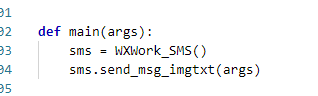
- 主流程调用模块直接传入图片路径
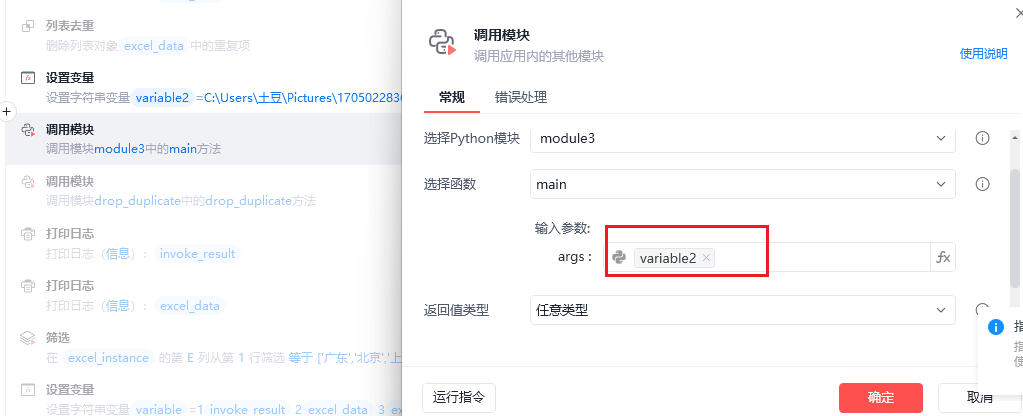
2.3.2、整体代码
# 使用提醒:
# 1. xbot包提供软件自动化、数据表格、Excel、日志、AI等功能
# 2. package包提供访问当前应用数据的功能,如获取元素、访问全局变量、获取资源文件等功能
# 3. 当此模块作为流程独立运行时执行main函数
# 4. 可视化流程中可以通过"调用模块"的指令使用此模块

import xbot
from xbot import print, sleep
from .import package
from .package import variables as glv

import requests
import json
import base64
import hashlib

# 修改你的机器人地址
robot_url = 'https://qyapi.weixin.qq.com/cgi-bin/webhook/send?key=a7222xxxx89-9940-xxxxxdc8b'

# 每个机器人发送的消息不能超过20条/分钟
# "mentioned_list":["@all"],  # userid的列表,提醒群中的指定成员(@某个成员),@all表示提醒所有人,如果开发者获取不到userid,可以使用mentioned_mobile_list
# "mentioned_mobile_list":["@all"]  # 手机号列表,提醒手机号对应的群成员(@某个成员),@all表示提醒所有人
# 图文消息的图片链接,支持JPG、PNG格式,较好的效果为大图 1068*455,小图150*150。
# 上传的文件限制:要求文件大小在5B~20M之间

class WXWork_SMS :
    # 图文类型消息
    def send_msg_imgtxt(self,image_path) :
        headers = {"Content-Type" : "news"}
        send_url = robot_url
        # 上传图传得到url
        url_json = upload_tuchuang(image_path)
        image_url = url_json.get('url')
        send_data = {
            "msgtype": "news",
            "news": {
            "articles" : [
                {
                    "title" : "土豆测试", #标题,不超过128个字节,超过会自动截断
                    "description" : "土豆的头像", #描述,不超过512个字节,超过会自动截断
                    "url" : "https://www.yingdao.com/community/userCenter?userUuid=625161943950667776", #点击后跳转的链接
                    "picurl" : image_url
                }
                ]
            }
        }

        res = requests.post(url = send_url, headers = headers, json = send_data)
        print(res.text)

# 图床注册链接,进去微信登录后,点击用户中心->查看token->拉到最下面->试用会员
# https://www.superbed.cn/timeline
# 上传图片到图床转换url 可自己找图床工具
def upload_tuchuang(file_path):
    # 修改自己的token
    token = "7a82c8578ffa4e1fb1f31b4d3b6679b4"
    url = "https://api.superbed.cn/upload"
    resp = requests.post(url,data={"token": token}, files={"file": open(file_path, "rb")})
    json_res = resp.json()
    if json_res.get('err') == 0:
        print(f"本地图片上传图床成功,file:{file_path}")
        return json_res
    else:
        print(f"本地图片上传图床失败,file:{file_path}")

# 文件转base64
def path_base64(path):
    """
    文件转换为base64
    :param path: 文件路径
    :return:
    """
    with open(path, "rb") as f:
        byte_data = f.read()
    base64_str = base64.b64encode(byte_data).decode("ascii")    # 二进制转base64
    return base64_str

# 文件转md5
def path_md5(path):
    """
    文件转换为md5
    :param path: 文件路径
    :return:
    """
    with open(path, "rb") as f:
        byte_data = f.read()
    md5_str = md5(byte_data)
    return md5_str

# 文件md加密
def md5(text):
    """
    md5加密
    :param text:
    :return:
    """
    m = hashlib.md5()
    m.update(text)
    return m.hexdigest()


def main(args):
    sms = WXWork_SMS()
    sms.send_msg_imgtxt(args)
全部评论(1)
最新
发布评论
评论


